> ## Documentation Index
> Fetch the complete documentation index at: https://metorial.com/docs/llms.txt
> Use this file to discover all available pages before exploring further.
# Setting Up API Key Integrations
> Configure API key-based integrations in Metorial
API key integrations use a single set of credentials for your entire application. Perfect for services like search APIs (Exa, Tavily) where you don't need user-specific authorization—just get an API key, configure it, and start building.
**What you'll learn:**
* How to configure API key-based providers
* How to test integrations
**Related resources:**
* [Browsing the Catalog](/integrations-browsing-catalog)
* [Integrations Overview](/integrations-overview)
## Configuring an API Key Integration
Sign up for the service (e.g., Exa, Tavily) and generate an API key.
In Metorial, go to **Providers** and search for the integration.
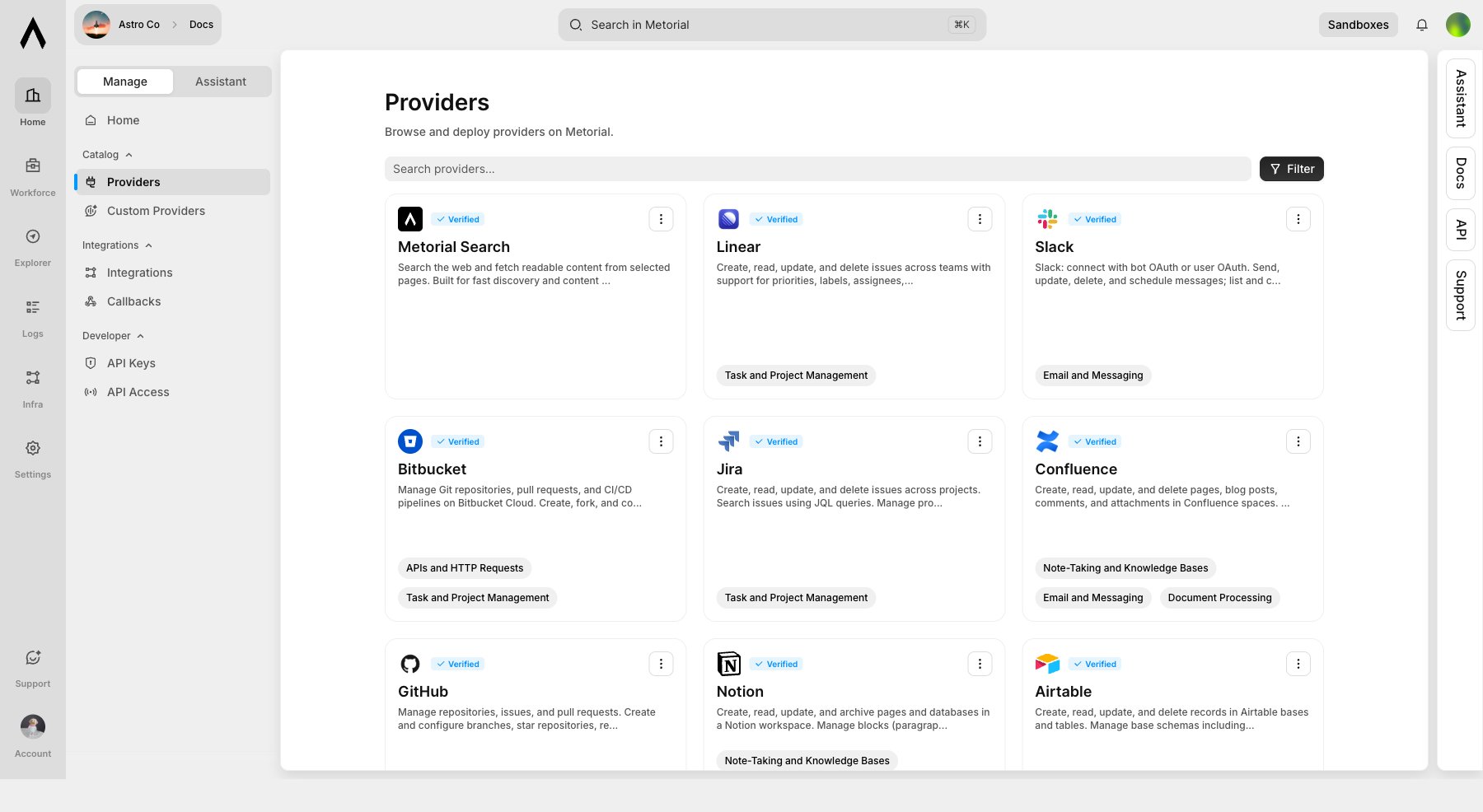 Open the provider, click **Use Provider**, choose **Integration**, then select the API key auth method. Paste the API key when creating auth credentials. Metorial stores credentials securely as provider auth configuration.
Use Explorer to verify the integration works before using it in an application.
## Using API Key Integrations
After configuring your integration, pass the provider deployment or integration details when creating a session. The integration handles authentication automatically using the credentials you configured.
```typescript TypeScript theme={null}
import { Metorial } from 'metorial';
import { metorialAiSdk } from '@metorial/ai-sdk';
import { anthropic } from '@ai-sdk/anthropic';
import { generateText } from 'ai';
let metorial = new Metorial({
apiKey: process.env.METORIAL_API_KEY
});
let session = await metorial.connect({
adapter: metorialAiSdk(),
providers: [
{ providerDeploymentId: 'your-exa-deployment-id' }
]
});
let tools = session.tools();
```
```python Python theme={null}
from metorial import Metorial
from anthropic import AsyncAnthropic
import asyncio
import os
metorial = Metorial(api_key=os.getenv("METORIAL_API_KEY"))
anthropic_client = AsyncAnthropic(api_key=os.getenv("ANTHROPIC_API_KEY"))
async def main():
async with metorial.provider_session(
provider="anthropic",
providers=[{"provider_deployment_id": "your-exa-deployment-id"}],
) as session:
response = await anthropic_client.messages.create(
model="claude-sonnet-4-5",
max_tokens=1024,
tools=session.tools,
messages=[{"role": "user", "content": "Search for the latest AI news"}],
)
print(response.content[0].text)
asyncio.run(main())
```
```bash REST theme={null}
curl -X POST https://api.metorial.com/sessions \
-H "Authorization: Bearer metorial_sk_abc123" \
-H "Content-Type: application/json" \
-d '{
"providers": [
{
"provider_deployment_id": "pdp_your_exa_deployment"
}
]
}'
```
## What's Next?
Set up user-authorized integrations.
Build your first AI agent.
Open the provider, click **Use Provider**, choose **Integration**, then select the API key auth method. Paste the API key when creating auth credentials. Metorial stores credentials securely as provider auth configuration.
Use Explorer to verify the integration works before using it in an application.
## Using API Key Integrations
After configuring your integration, pass the provider deployment or integration details when creating a session. The integration handles authentication automatically using the credentials you configured.
```typescript TypeScript theme={null}
import { Metorial } from 'metorial';
import { metorialAiSdk } from '@metorial/ai-sdk';
import { anthropic } from '@ai-sdk/anthropic';
import { generateText } from 'ai';
let metorial = new Metorial({
apiKey: process.env.METORIAL_API_KEY
});
let session = await metorial.connect({
adapter: metorialAiSdk(),
providers: [
{ providerDeploymentId: 'your-exa-deployment-id' }
]
});
let tools = session.tools();
```
```python Python theme={null}
from metorial import Metorial
from anthropic import AsyncAnthropic
import asyncio
import os
metorial = Metorial(api_key=os.getenv("METORIAL_API_KEY"))
anthropic_client = AsyncAnthropic(api_key=os.getenv("ANTHROPIC_API_KEY"))
async def main():
async with metorial.provider_session(
provider="anthropic",
providers=[{"provider_deployment_id": "your-exa-deployment-id"}],
) as session:
response = await anthropic_client.messages.create(
model="claude-sonnet-4-5",
max_tokens=1024,
tools=session.tools,
messages=[{"role": "user", "content": "Search for the latest AI news"}],
)
print(response.content[0].text)
asyncio.run(main())
```
```bash REST theme={null}
curl -X POST https://api.metorial.com/sessions \
-H "Authorization: Bearer metorial_sk_abc123" \
-H "Content-Type: application/json" \
-d '{
"providers": [
{
"provider_deployment_id": "pdp_your_exa_deployment"
}
]
}'
```
## What's Next?
Set up user-authorized integrations.
Build your first AI agent.