> ## Documentation Index
> Fetch the complete documentation index at: https://metorial.com/docs/llms.txt
> Use this file to discover all available pages before exploring further.
# Provider Skills
> Provider skills are catalog summaries that describe what a provider can do. They are different from executable tools.
Provider skills are the short capability bullets shown on provider pages. They help you quickly understand what a provider is good at before inspecting its tools, versions, or setup options.
These are different from [Magic Skills](/product-magic-skills), which are reusable Workforce assets that teams create and govern.
**What you'll learn:**
* What provider skills are
* How skills differ from tools
* Where skills fit into provider selection and tool filtering
## Skills In The Dashboard
Provider pages show a **Provider Summary** section. The dashboard code treats this as an AI-generated overview of the provider's capabilities and features.
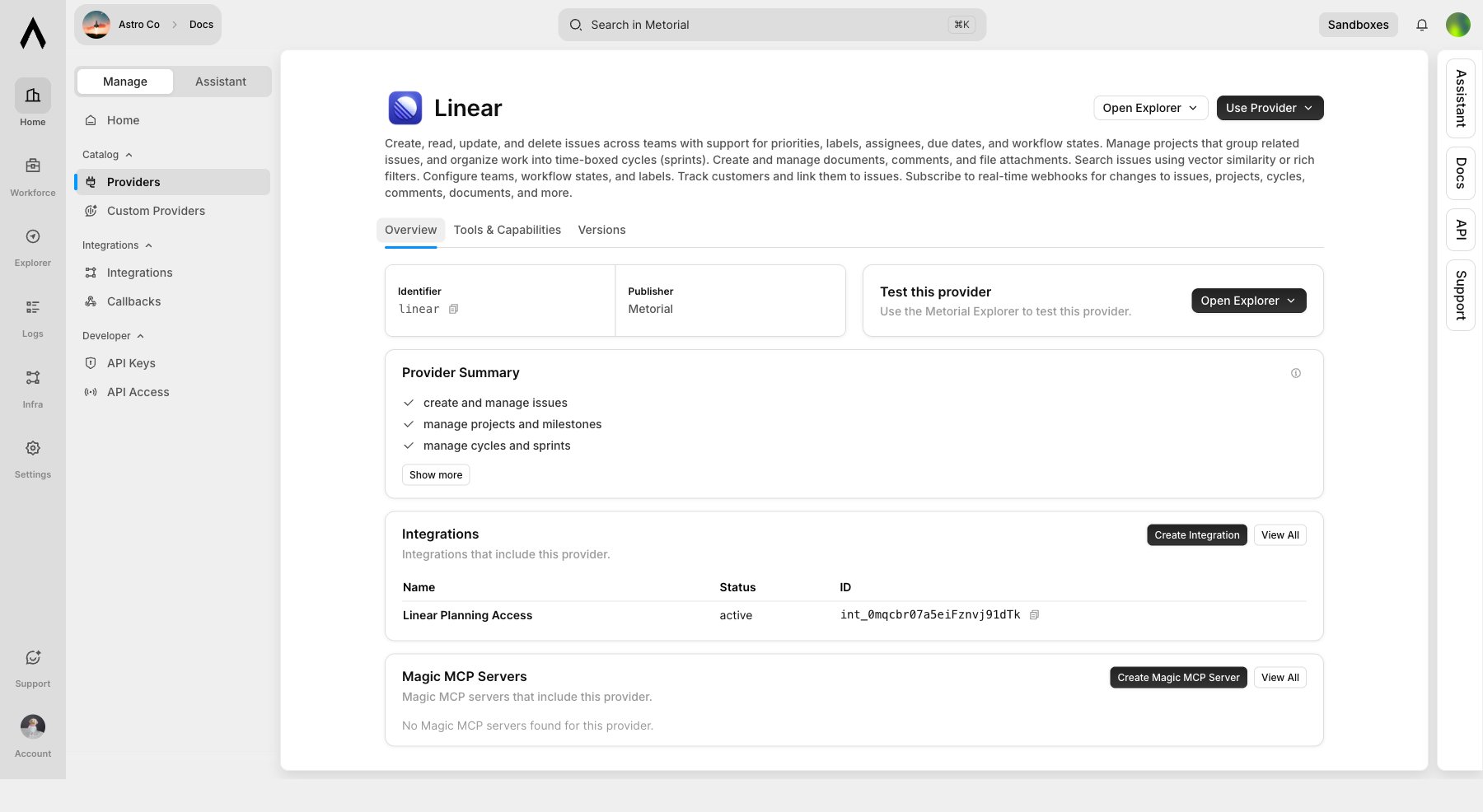 Examples from the dashboard include summaries such as:
* create and manage issues
* manage projects and milestones
* manage cycles and sprints
* manage repositories
* create pull requests
* star repositories
## Skills Versus Tools
Skills are not executable tool calls. They are summaries that help you decide whether a provider is relevant.
| Concept | Meaning |
| ---------------- | ----------------------------------------------------------------- |
| Provider skill | Human-readable capability summary on a provider page |
| Magic Skill | Reusable Workforce skill created and governed by your team |
| Tool | Executable MCP capability with an input/output schema |
| Tool filter | Policy that allows, rejects, or mixes specific tools during setup |
| Integration | Reusable configured provider setup |
| Magic MCP Server | Connectable MCP endpoint built from provider access |
## Selection Flow
```mermaid theme={null}
flowchart TD
Catalog["Browse provider catalog"]
Skills["Read provider skills"]
Tools["Inspect tools and capabilities"]
Setup["Use Provider"]
Filters["Review tool filters"]
Integration["Create Integration"]
Magic["Create Magic MCP Server"]
Catalog --> Skills --> Tools --> Setup
Setup --> Filters
Filters --> Integration
Filters --> Magic
```
## Tool Filters
Provider setup groups tools into read-only, write, and destructive categories. For providers such as GitHub and Linear, this is where the broad skill summary becomes concrete access control.
Examples from the dashboard include summaries such as:
* create and manage issues
* manage projects and milestones
* manage cycles and sprints
* manage repositories
* create pull requests
* star repositories
## Skills Versus Tools
Skills are not executable tool calls. They are summaries that help you decide whether a provider is relevant.
| Concept | Meaning |
| ---------------- | ----------------------------------------------------------------- |
| Provider skill | Human-readable capability summary on a provider page |
| Magic Skill | Reusable Workforce skill created and governed by your team |
| Tool | Executable MCP capability with an input/output schema |
| Tool filter | Policy that allows, rejects, or mixes specific tools during setup |
| Integration | Reusable configured provider setup |
| Magic MCP Server | Connectable MCP endpoint built from provider access |
## Selection Flow
```mermaid theme={null}
flowchart TD
Catalog["Browse provider catalog"]
Skills["Read provider skills"]
Tools["Inspect tools and capabilities"]
Setup["Use Provider"]
Filters["Review tool filters"]
Integration["Create Integration"]
Magic["Create Magic MCP Server"]
Catalog --> Skills --> Tools --> Setup
Setup --> Filters
Filters --> Integration
Filters --> Magic
```
## Tool Filters
Provider setup groups tools into read-only, write, and destructive categories. For providers such as GitHub and Linear, this is where the broad skill summary becomes concrete access control.
 Use skills to choose a provider. Use tools and tool filters to decide what an agent is allowed to do.
## Related Pages
Learn how providers, integrations, configs, and auth configs fit together.
Learn how approved provider access is configured.
Use skills to choose a provider. Use tools and tool filters to decide what an agent is allowed to do.
## Related Pages
Learn how providers, integrations, configs, and auth configs fit together.
Learn how approved provider access is configured.