Permissions that narrow access
Govern what people and agents can do
A person's identity follows their agent at every step. From the moment they sign in, that identity decides which tools and providers the agent can reach and carries through to every call it makes.
- 01
Sign in with SSO
People sign in through your identity provider using SSO and SAML. Every agent starts from a real account instead of a shared login.
- 02
Policy starts with identity
The signed-in user defines the access boundary for every agent. From there, policies can narrow what a specific agent may use by tool, provider, action, or session.
- 03
Define access per agent
Each agent gets a distinct identity and its own allowed actions. Agent identification lets you restrict one agent without changing what the person or other agents can do.
- 04
Easy access, no tokens
Agents connect to providers through tokenless auth and provider SSO. Work gets done without anyone sharing or storing long-lived keys.
What you control
Access controls built for agent workflows
Manage users, groups, and service accounts together, including inside Portals. Security and IT keep control without slowing teams down.
SSO and SAML
People sign in through the identity provider your company already uses. Agent access follows existing accounts and offboarding.
- SSO and SAML sign-in
- Tied to your identity provider
- Access follows real accounts
Policies and access control
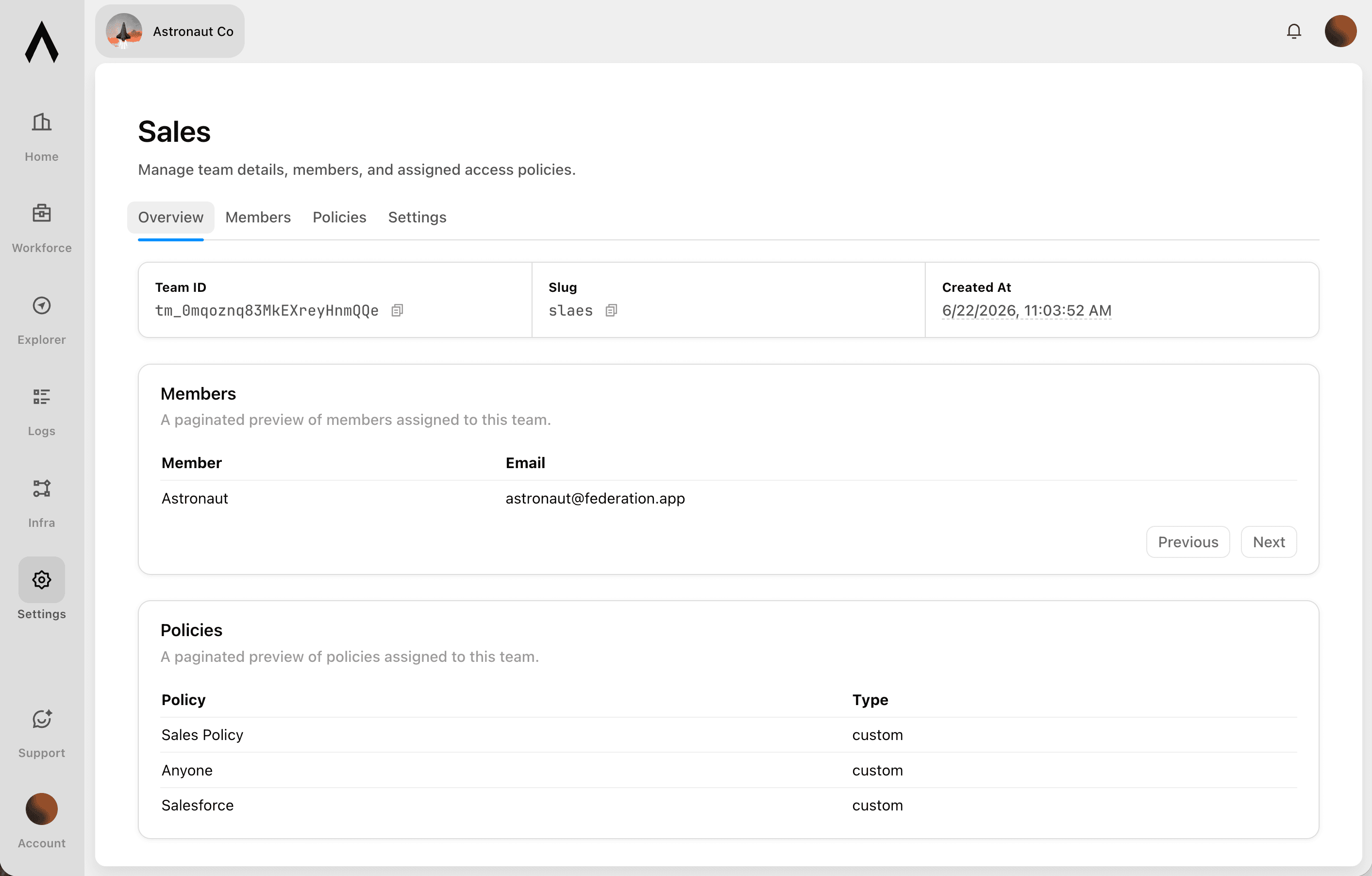
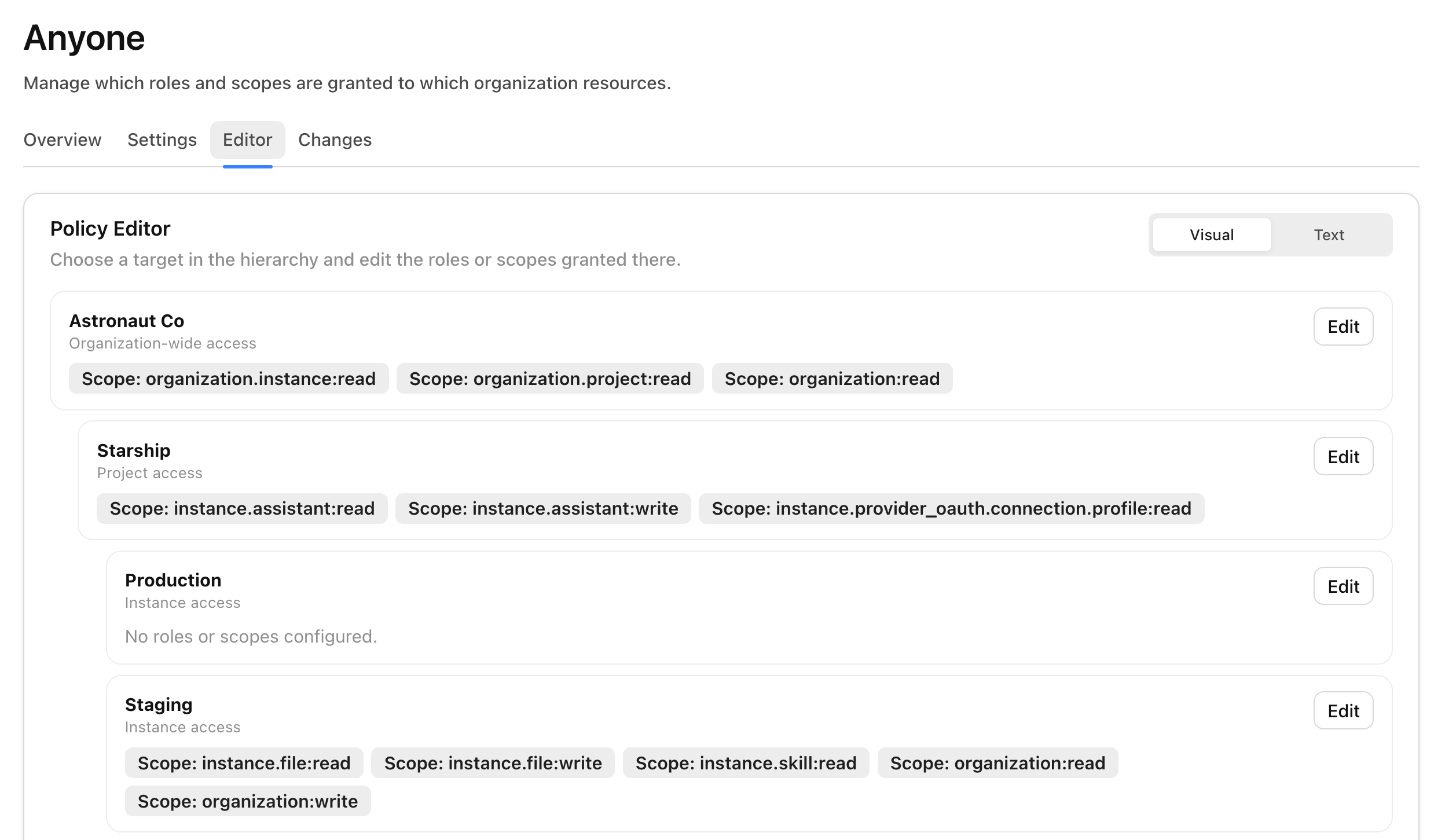
Per-user and per-group access policies decide which agents, tools, and providers each person can reach, managed centrally for the whole team.
- Per-user and per-group policies
- Scoped across agents, tools, and providers
- Users, groups, and service accounts
Tokenless auth and provider SSO
Agents reach providers without shared credentials, and the identity behind each agent carries through every call.
- No shared or long-lived keys with tokenless auth
- Provider SSO for connections
- Identity carried through to providers
One access layer behind every connection
Portals and Magic MCP are how people connect agents. Access Control is the layer underneath both, deciding who reaches what.
Portals only shows what people can use
Portals shows each person only the integrations and skills their policies allow.
Magic MCP runs on the real identity
Every Magic MCP call runs on the user behind it and reaches only the tools their policies allow.
One place to manage it all
Change a policy once and it applies everywhere: Portals, Magic MCP, and the API.
Portals
A unified portal where employees connect agents to approved integrations and skills with company SSO.
Magic MCP
One MCP URL that connects an agent to every tool a person is allowed to use, tokenless and fully logged.
Tracing
Every governed call is recorded with the user behind it. Security can see exactly what happened.
What you can scope
Access defined across who, what, and how
Control who can connect, which systems they reach, and what each agent is allowed to do.
- Who
Users, groups, and service accounts
Manage people, the groups imported from your identity provider, and the service accounts agents run as, all governed the same way. Non-human access is never an exception.
- What
Agents, tools, and providers
Decide which agents can access Metorial, which tools and actions those agents can call, and which providers they can reach. Allow a provider while still blocking specific tools.
- How
Per-agent limits and instant revocation
Cap what any single agent can do, revoke access at any time, and let offboarding in your identity provider remove agent access the moment someone leaves.
Frequently asked questions
Common questions about Access Control.
How does Metorial control who can use an agent?
Metorial applies access policies across users and groups. You decide which agents, tools, and providers each person can reach from one place.Does Metorial support SSO and SAML?
Yes. People sign in through your existing identity provider with SSO and SAML. Agent access follows the accounts your team already uses.Can agents act on behalf of a user?
Yes. With identity delegation and agent identification, each agent acts with the identity of the person behind it and never exceeds what that person is allowed to do.How do agents reach providers without shared credentials?
Tokenless auth and provider SSO let agents connect to providers without anyone sharing or storing long-lived keys.Can we manage access for groups and service accounts?
Yes. Manage users, groups, and service accounts together, including inside Portals. Non-human access is governed the same way as people.How does access control work with Portals?
Portals is the workforce surface that runs on access control. Each person only sees and connects the integrations and skills their policies allow. The catalog they get is already scoped to what they can use.How does access control apply to Magic MCP?
Every call through the Magic MCP URL runs on the real identity of the person behind it. Policies decide which tools and providers that link can reach, and an agent can never do more than the person can.