Make agents work for GTM teams

Metorial connects AI agents to the CRM, enrichment, email, and analytics tools your revenue teams live in. People sign in with company SSO and connect through one Magic MCP link, with no tokens or code.

Use cases

Metorial connects AI agents to the CRM, enrichment, email, and analytics tools your revenue teams live in. People sign in with company SSO and connect through one Magic MCP link, with no tokens or code.

  1. 01

    Account research

    Agents pull CRM records, recent interactions, and enrichment data to prep context before calls, handoffs, or outreach.

  2. 02

    Campaign operations

    Agents track campaign status, surface performance data, and coordinate follow-ups across marketing and analytics tools.

  3. 03

    Revenue operations

    Agents watch pipeline health, surface stalled deals, and update records after sales calls so rev-ops works from current data.

  4. 04

    Outreach support

    Agents personalize messaging from CRM context and enrichment signals so reps send more relevant outreach in less time.

Agents reach your GTM tools

Give agents access to Salesforce, HubSpot, enrichment, email, and analytics tools through 1000+ verified integrations plus your own custom providers.

Reps and marketers connect in one step

Sign in with company SSO and connect through one Magic MCP link, with no tokens to manage and no code to write. Access is tied to each person’s identity.

Bounded action in customer-facing tools

Decide what agents can read, write, or trigger in customer-facing systems, and trace every interaction.

Solution

Connect agents to your real systems, share the knowledge that makes them helpful, and keep every action governed and visible, no tokens or code required.

lumon-industries.metorial.com
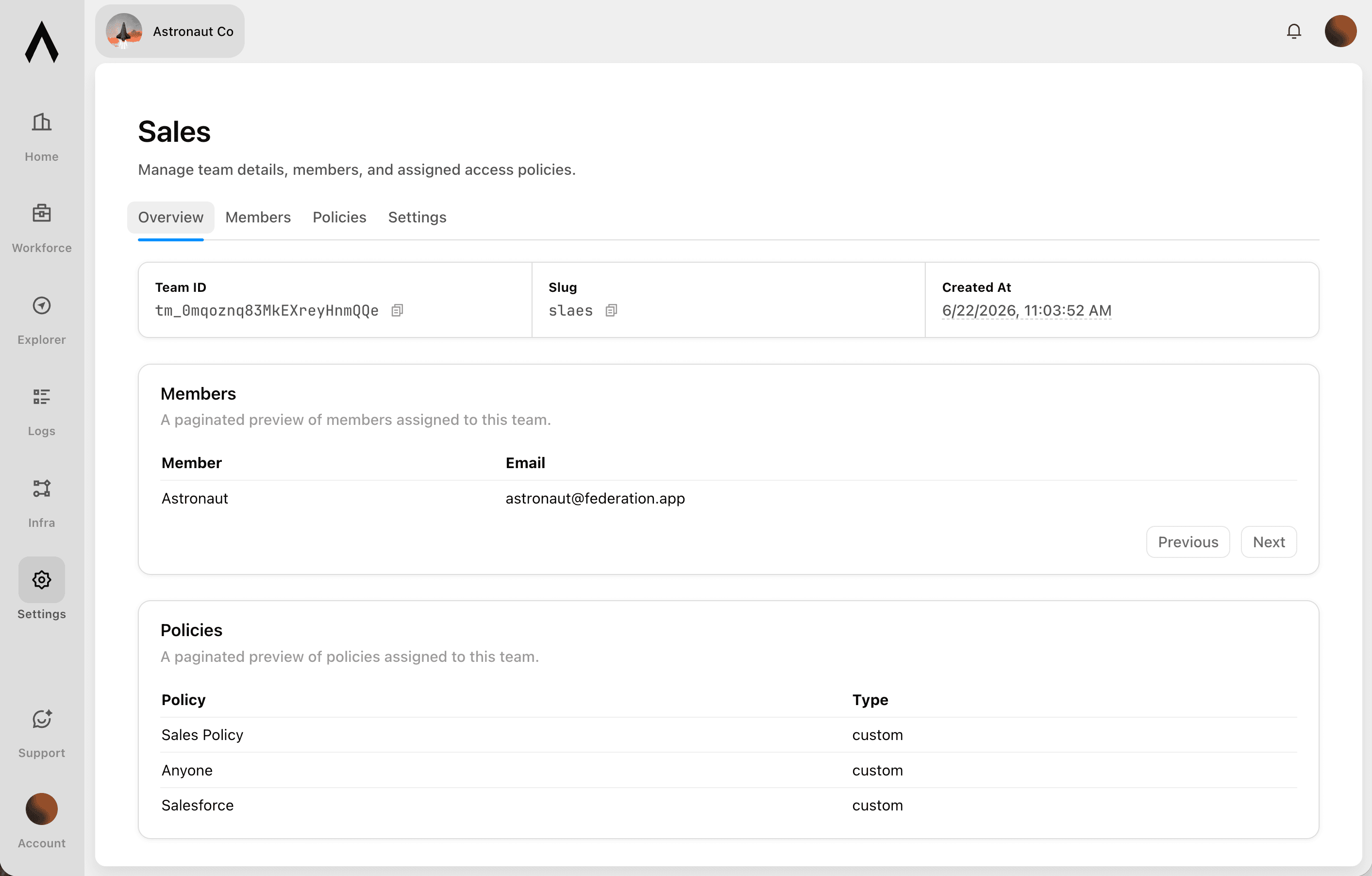
The Metorial Workforce console showing teams, agents, connected tools, and access policies.
  1. Connect

    Agents reach the systems where work happens

    Give teams access to agents that can use business tools, data sources, and enterprise systems through governed integrations and MCP-compatible providers.

  2. Govern

    Access follows users and teams

    Apply policies across users, groups, providers, and tools so agents act with the right permissions instead of unmanaged shared credentials.

  3. Observe

    Every interaction is traceable

    See which agent acted, which user authorized it, which tool was called, and what happened, so AI adoption stays visible to security and operations teams.
Solution

Codex, Claude Code, Cursor, and any other agent can reach the systems your teams already use. Metorial handles the connections, the access, and the visibility, so you do not have to build them yourself.

lumon-industries.metorial.com
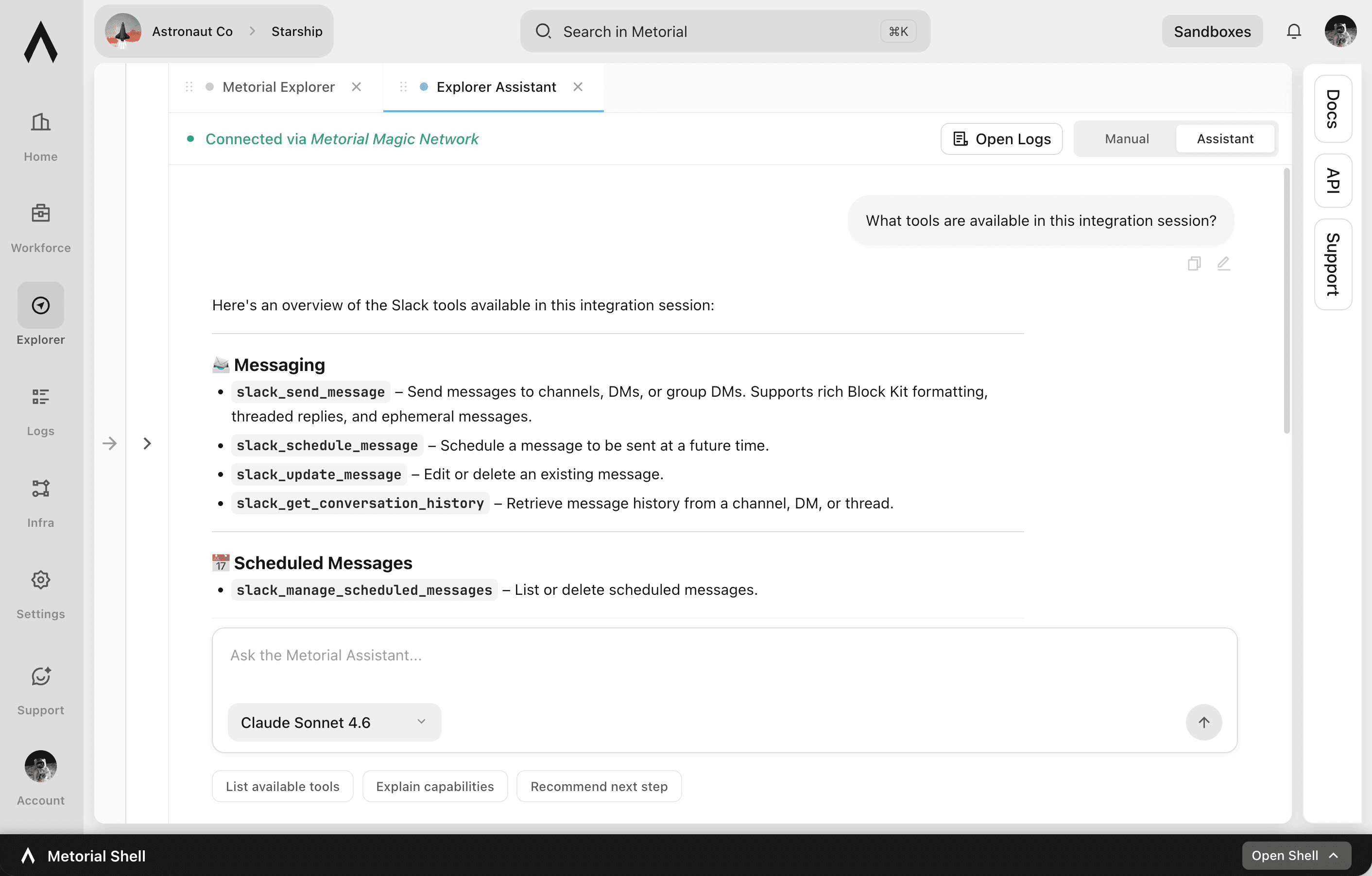
The Metorial agent access console showing providers, tool calls, and traces.
  1. Connect

    Reach the tools agents need

    Point an agent at Metorial and it can use 1,000 validated integrations, custom providers, and internal systems through one governed layer.

  2. Control

    Limit what agents can do

    Define access policies around users, groups, tools, and providers so each agent gets the right level of access.

  3. Trace

    Understand every tool call

    Record agent actions, tool inputs, provider responses, and downstream effects for debugging, audits, and operational visibility.

Product

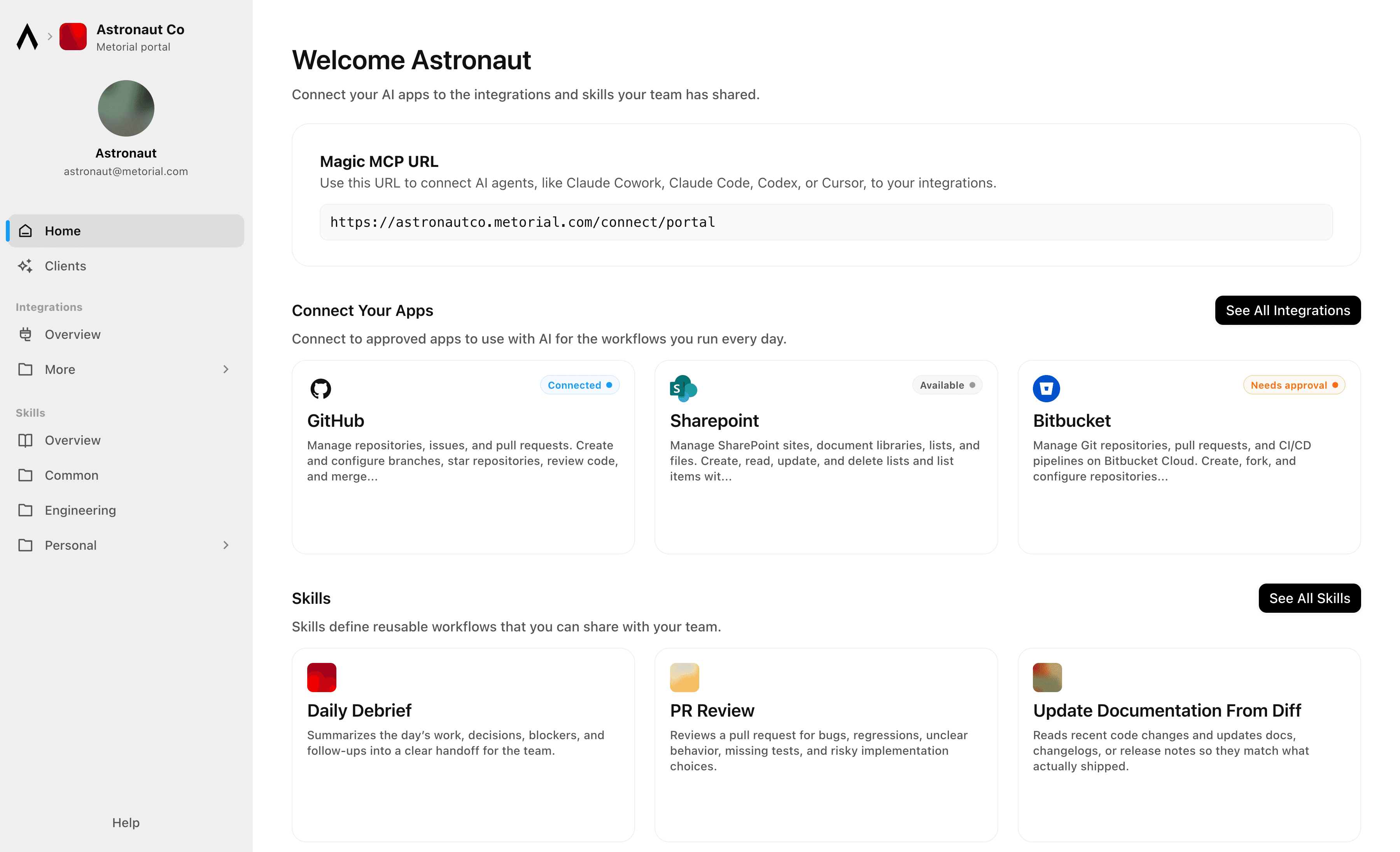
Metorial Portals lets employees connect AI agents to the integrations and skills your company already uses. People sign in with company SSO and connect through one Magic MCP URL. Admins decide who gets access to what.

lumon-industries.metorial.com
Metorial Portals showing the integrations and skills an employee can connect their agent to.
  1. Browse

    A catalog of approved tools and skills

    Employees open Metorial Portals to find the integrations and skills your company approved, in one familiar place, with no setup to figure out.

  2. Connect

    One link to start working

    People connect their agent through a single Magic MCP URL and sign in with the company login they already have, with no tokens to manage.

  3. Govern

    Each person sees only what they should

    Access groups and policies decide which tools and skills appear for each person, and people can request more when they need it.

Product

Magic MCP is a single URL you paste into your AI client. Sign in with the login you already use, and your agent reaches every integration and tool you allow it to use.

lumon-industries.metorial.com
A single Magic MCP URL connecting an AI agent to the integrations a person is allowed to use.
  1. One URL

    Paste one link into any agent

    Drop a single Magic MCP URL into any MCP-compatible client. Nothing to install and no integration to wire up tool by tool.

  2. Every tool

    1000+ integrations, plus your own

    The same link reaches a growing catalog of verified integrations and the custom or remote MCP servers only your team has, kept current for you.

  3. Your access

    Only what you allow, never more

    Sign in with the identity you already use and stay tokenless. Behind the link, every call runs on the real user and reaches only the tools they’re allowed.

Product

Start from 1000+ verified integrations or add your own, and give every one a governed path to your agents under existing SSO and access policies.

lumon-industries.metorial.com
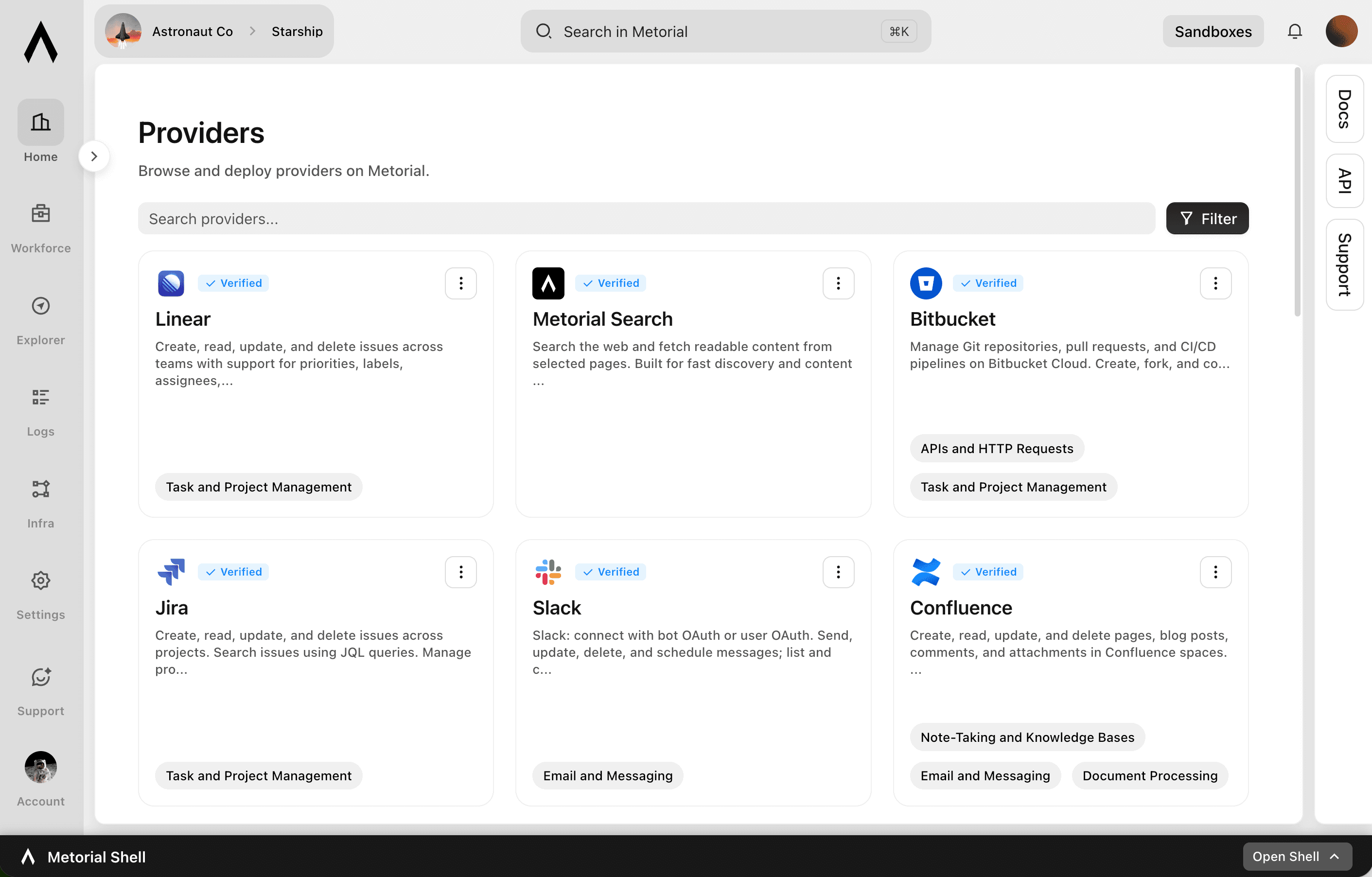
The Metorial integrations catalog showing verified providers, tools, and access controls.
  1. Connect

    Any tool, ours or yours

    Start with 1000+ verified integrations or add the internal systems and private APIs only your team has as custom, remote, or Docker-based providers.

  2. Reach

    One link for every approved tool

    Agents reach the integrations they’re allowed to use through a single connection, with no connector project per tool.

  3. Govern

    Scoped and traceable by default

    Access follows the groups and policies you already manage, down to individual tools and actions, and every call stays on the record.

Product

Sign in with company SSO, set policies per user and group, and let agents act on real identity across Portals and Magic MCP.

lumon-industries.metorial.com
The Metorial access console showing users, groups, access policies, and connected identity providers.
  1. Who

    People, groups, and agents

    People sign in with your existing identity, and groups, service accounts, and each agent are governed the same way. Non-human access is never an exception.

  2. What

    Agents, tools, and providers

    Decide which agents can act and which tools, actions, and providers each one can reach. Allow a provider while still blocking specific tools.

  3. How

    Set once, enforced everywhere

    Policies follow the real user behind every agent, cap what any single agent can do, and can be revoked the moment someone leaves.

Workflows

Apollo Prospect Sequencing with Slack Deal Room Notifications

Search Apollo for new prospects matching updated ICP criteria, enroll qualified contacts in the right outbound sequences, and notify the sales team in Slack with prospect summaries so reps can personalize follow-up with full context.

Automate ActiveTrail Campaign Performance Reporting to Monday.com

After email campaigns are sent, retrieve detailed performance reports from Activetrail and write key metrics such as open rate, click rate, and unsubscribes as structured items in a Monday.com reporting board.

Automate Salesforce Opportunity Updates from Email Conversations

Revenue teams lose deal context when key email exchanges never make it back to Salesforce. This workflow searches Outlook for recent email threads related to open opportunities, summarizes the key developments, and updates the corresponding Salesforce opportunity records to keep the CRM accurate.

Automate Shopify Refund Order Management and Customer Notifications via Twilio

When refund-eligible orders are identified in Shopify, process the order status update, notify the customer via SMS through Twilio, and keep the operations team informed of refund activity.

Automate SMS and WhatsApp Reengagement Campaigns for Dormant Contacts

Identify contacts in Activetrail who have not engaged with emails in 90 days, segment them into a reengagement group, and launch a targeted SMS or WhatsApp campaign to bring them back into the active funnel.

Build a Prospect Research Brief Using Web Search and Apollo Data

Before an account executive calls a prospect, the agent searches the web for company news and competitive positioning, cross-references Apollo for contact details and org structure, and compiles a pre-call research brief.

Bulk Upsert Salesforce Leads into Item CRM After Web Research Enrichment

The agent pulls a list of Salesforce leads, enriches each one with web research on their company and recent activity, then bulk upserts the enriched records into Item CRM with updated fields and contact notes.

Competitive Intelligence Digest for Sales Teams

Research competitor domains for SEO positioning, keyword gaps, and technology stacks, then compile findings into a structured briefing posted to a Slack channel for the sales team.

Competitive Intelligence Research and Slack Briefing

Automatically search the web for competitor news, product updates, and pricing changes, then deliver a structured competitive intelligence briefing to the relevant Slack channel so GTM teams stay informed without manual research.

Compile Competitive Intelligence Briefings from Web Research

Research competitor websites, recent news, and product announcements using web search, then compile structured briefings that are posted to a Slack channel for the go-to-market team.

Compile Competitive Intelligence Reports from Web Research into SharePoint

The agent searches the web for competitor product updates, pricing changes, and press coverage, extracts structured intelligence from the top sources, and saves a formatted competitive report to a SharePoint document library for the product and sales teams.

Compile Competitive Intelligence Reports Using Web Research

Product and marketing teams need regular competitive intelligence but manual research across competitor websites, press releases, and review sites is time-consuming. This workflow searches for recent competitor updates, extracts structured content from key pages, and compiles a digest that can be shared with the team.

Coordinate Client Meeting Scheduling Across Calendly and Outlook

Advisors and client-facing teams waste time juggling availability windows and sending manual calendar invites. This workflow checks Calendly availability, finds open time slots that work for both parties, books the meeting, and creates a corresponding Outlook calendar event with all necessary details.

Domain Research and Prospect Qualification for Business Development

Research a prospect's domain to retrieve technology stack, keyword rankings, and backlink profile, then validate their contact email and enrich company data before creating a qualified record in the CRM.

Draft and Schedule Email Campaigns Based on Airtable Content Calendar

Read approved campaign content from an Airtable content calendar, create email campaigns in Activetrail with the correct segments and scheduling, and update the Airtable record with the campaign ID and status.

Integrations

Metorial Search

Search the web and fetch readable content from selected pages. Built for fast discovery and content extraction.

Hubspot

Create, read, update, and delete CRM objects including contacts, companies, deals, tickets, and custom objects. Manage associations between CRM records. Track engagements such as calls, emails, meetings, notes, and tasks. Send transactional and marketing emails, manage campaigns, and handle subscription preferences. Build and manage marketing workflows, sequences, and automation actions. Manage CMS content including blog posts, landing pages, and HubDB tables. Handle commerce data including products, orders, invoices, quotes, and payments. Create and manage contact lists for segmentation. Configure deal, ticket, and order pipelines with custom stages. Search and filter CRM records. Bulk import and export CRM data. Manage users, teams, and account settings. Subscribe to webhooks for real-time notifications on object creation, deletion, property changes, merges, and association changes.

Slack

Slack: connect with bot OAuth or user OAuth. Send, update, delete, and schedule messages; list and cancel scheduled messages; open DMs and group DMs; manage conversations, members, files, reactions, pins, bookmarks, reminders, user groups, and user status; search messages and files with user scopes; and retrieve user, conversation, and workspace info.

Salesforce

Manage CRM data including Accounts, Contacts, Leads, Opportunities, Cases, and custom objects. Create, read, update, and delete records. Query data using SOQL and search across objects using SOSL. Perform bulk data operations for large-scale imports, exports, and migrations. Execute composite requests to batch multiple operations in a single API call. Access analytics, reports, and dashboards. Manage files and attachments associated with records. Interact with Chatter feeds, posts, and groups for social collaboration. Subscribe to real-time change events via Change Data Capture and Platform Events. Manage org metadata including custom objects, fields, layouts, and workflows. Query data using GraphQL for precise data retrieval across related objects.

Apolloio

Search and prospect B2B contacts and companies from a database of over 275 million people and 70 million organizations. Enrich people and company data with emails, phone numbers, and firmographic details. Create and manage contacts, accounts, deals, and tasks. Add contacts to email sequences and manage sequence statuses. Log and search call records. Perform bulk operations for contact creation, account creation, task creation, and data enrichment.

Shopify

Manage e-commerce stores including products, orders, customers, inventory, and fulfillment. Create and update products with variants, images, and metafields. Process and track orders, draft orders, refunds, and transactions. Manage customer records, addresses, and marketing consent. Track and adjust inventory levels across multiple locations. Handle fulfillment workflows including routing to warehouses and third-party logistics. Create and manage discount codes, price rules, and automatic discounts. Configure shipping rates, carrier services, and delivery profiles. Build custom storefronts with cart management and checkout via the Storefront API. Manage content including pages, blogs, articles, and themes. Support B2B commerce with company profiles, catalogs, and custom pricing. Receive webhooks for events across orders, products, customers, inventory, fulfillment, collections, carts, checkouts, disputes, and more.

Gmail

Send, read, and search email messages with support for recipients, attachments, and HTML content. Create, update, and send drafts. Manage conversation threads and organize messages with labels. Search mailboxes using Gmail query syntax (from, to, subject, date, attachment filters). Configure mail settings including forwarding rules, filters, vacation responders, signatures, aliases, and delegates. Import and insert messages for migration. Sync mailbox changes incrementally via history API. Subscribe to mailbox change notifications via push notifications.

Mailchimp

Manage email marketing audiences, campaigns, and automations. Create, send, schedule, and track email campaigns with detailed reporting on opens, clicks, and bounces. Add, update, and organize audience contacts with tags, segments, and interest groups. Set up and manage automation workflows triggered by subscriber activity or events. Connect e-commerce stores to manage customers, products, orders, and carts. Create and manage reusable email templates and landing pages. Upload and organize files for use in campaigns. Send transactional emails via the Mandrill API. Post custom events to trigger targeted automations. Configure webhooks to track subscribe, unsubscribe, profile updates, and email delivery events.

Agent Mail

Create and manage email inboxes for AI agents to send, receive, and reply to emails programmatically. Organize conversations with threads, labels, and drafts. Search emails semantically across inboxes. Extract structured data from unstructured emails and auto-categorize messages with custom prompts. Manage custom domains, contact/mailing lists, and multi-tenant pods. Subscribe to webhook and WebSocket events for message delivery, bounces, complaints, and domain verification. Supports IMAP and SMTP access alongside the REST API.

Put your revenue teams to work with agents

Connect agents to the tools where go-to-market work happens, with onboarding that takes one sign-in.

Frequently asked questions

Common questions about Sales and Marketing.

  1. How do GTM teams get started?
    People sign in to Portals with company SSO and connect their agent with one Magic MCP link. There are no tokens to copy and no code to write.
  2. Agents reach Salesforce, HubSpot, and other CRM, enrichment, email, and analytics tools through verified integrations plus your own custom providers, all through the same link.
  3. Both. Agents can read, write, or trigger actions, and access control lets you set exactly what each team’s agents can do in customer-facing systems.
  4. No. Connections are tied to the person’s identity, so an agent only ever reaches what that person is allowed to use in your GTM stack.
  5. Yes. Every interaction is recorded with full tracing, so you can review which agent acted, on whose behalf, and what changed.