Moonfire
Use cases
Metorial connects AI agents to the document, contract, matter, and knowledge systems legal teams work in. People sign in with company SSO and connect through one Magic MCP link, with access tied to who they are.
- 01
Contract review
Agents retrieve relevant language, compare clause variations, and surface key obligations so attorneys review with the full document in hand.
- 02
Matter research
Agents search legal knowledge and case history to surface relevant precedent and context, cutting time spent across fragmented systems.
- 03
Knowledge retrieval
Agents find the right internal policies, templates, and precedents for a matter, while privileged material stays within each person’s access.
- 04
Legal operations
Agents track deadlines, update matter records, and coordinate document workflows so operations teams focus on the exceptions.
Agents reach your legal systems
Give agents access to document management, contract, matter, and knowledge systems through verified integrations and your own custom providers.
People connect in one step
Sign in with company SSO and connect through one Magic MCP link, with no tokens to manage and no code to write. Access is tied to each person’s identity.
Matter boundaries hold
Because access follows the person, an agent only reaches the matters they are cleared for, and every interaction is traced.
Customer stories

Solution
Metorial for Workforce
Connect agents to your real systems, share the knowledge that makes them helpful, and keep every action governed and visible, no tokens or code required.
lumon-industries.metorial.com
- Connect
Agents reach the systems where work happens
Give teams access to agents that can use business tools, data sources, and enterprise systems through governed integrations and MCP-compatible providers.
- Govern
Access follows users and teams
Apply policies across users, groups, providers, and tools so agents act with the right permissions instead of unmanaged shared credentials.
- Observe
Every interaction is traceable
See which agent acted, which user authorized it, which tool was called, and what happened, so AI adoption stays visible to security and operations teams.
Solution
Metorial for Enterprise
Connect AI agents to the tools and data your teams already use, onboard people in minutes with company SSO and one link, and keep the access control, security, and visibility the enterprise needs underneath.
lumon-industries.metorial.com
- Adopt
Agents that do real work
Give every team agents that reach the tools and data they already use, so people get value on day one instead of waiting on setup.
- Connect
Onboarding that just works
People sign in with company SSO and connect through one Magic MCP link, with no tokens to manage and no code to write.
- Enterprise-ready
The controls you need, built in
Access control, security checks, and full tracing come standard, so broad adoption stays governed without slowing anyone down.
Product
Portals
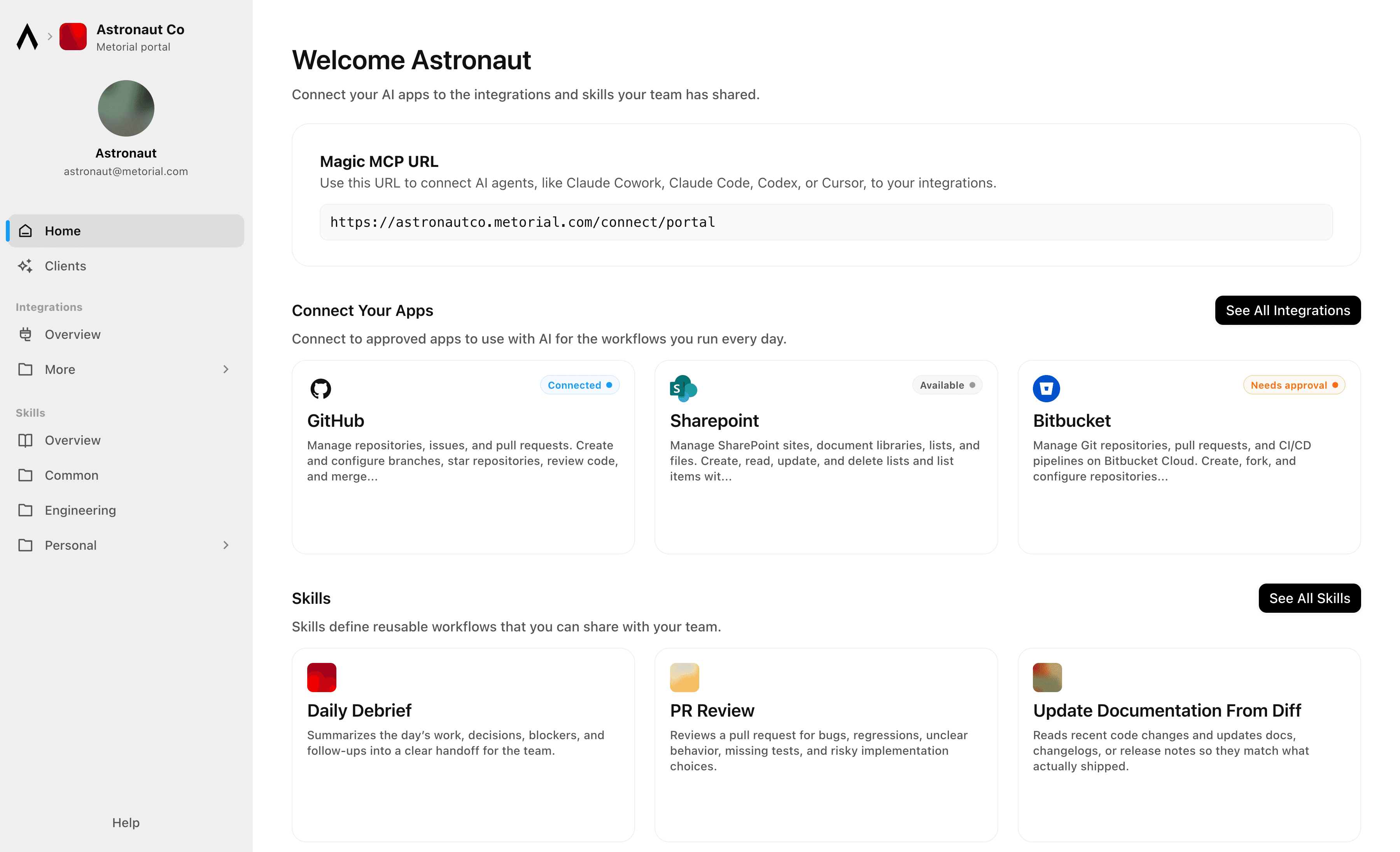
Metorial Portals lets employees connect AI agents to the integrations and skills your company already uses. People sign in with company SSO and connect through one Magic MCP URL. Admins decide who gets access to what.
lumon-industries.metorial.com
- Browse
A catalog of approved tools and skills
Employees open Metorial Portals to find the integrations and skills your company approved, in one familiar place, with no setup to figure out.
- Connect
One link to start working
People connect their agent through a single Magic MCP URL and sign in with the company login they already have, with no tokens to manage.
- Govern
Each person sees only what they should
Access groups and policies decide which tools and skills appear for each person, and people can request more when they need it.
Product
Magic MCP
Magic MCP is a single URL you paste into your AI client. Sign in with the login you already use, and your agent reaches every integration and tool you allow it to use.
lumon-industries.metorial.com
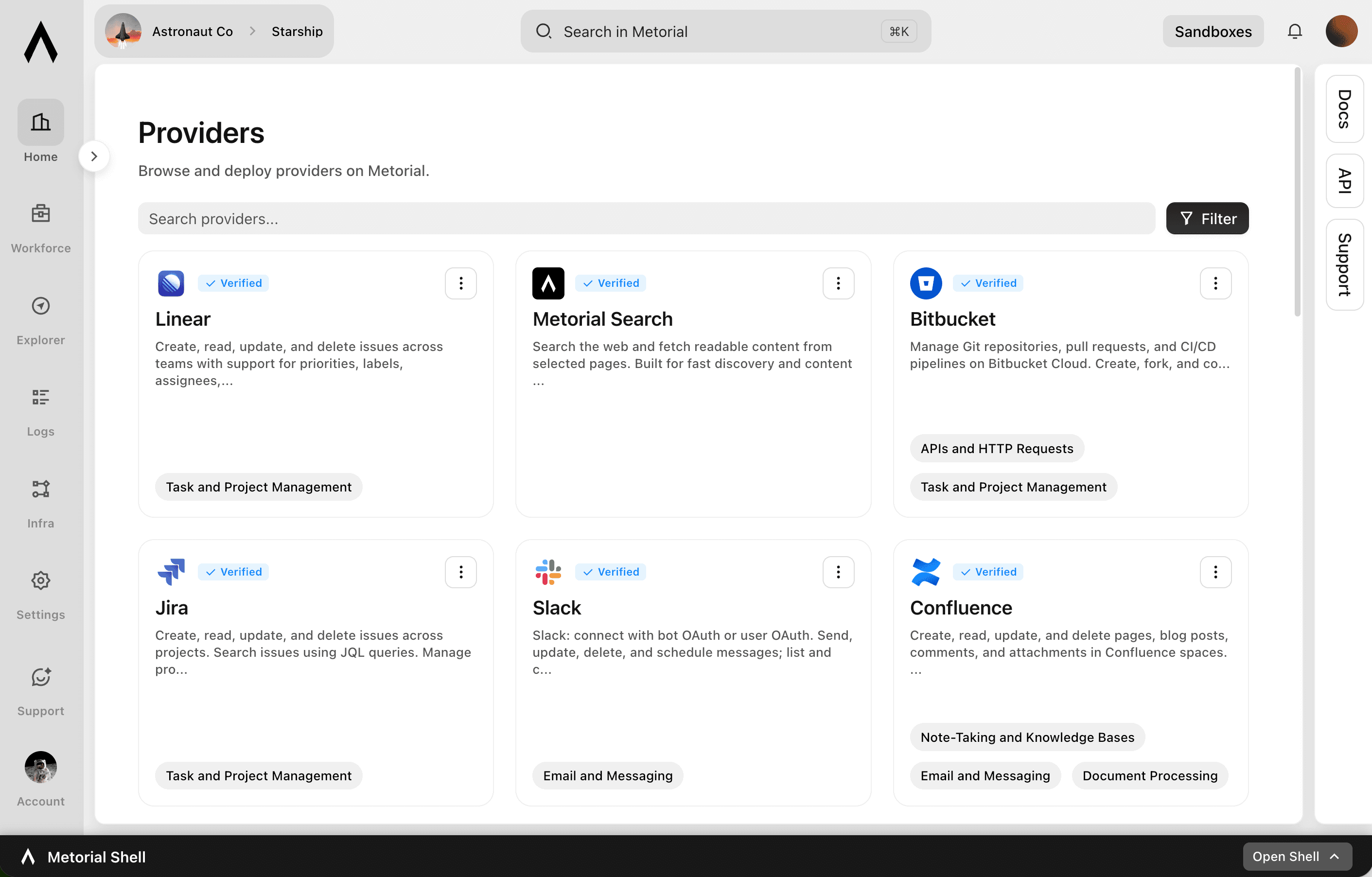
- One URL
Paste one link into any agent
Drop a single Magic MCP URL into any MCP-compatible client. Nothing to install and no integration to wire up tool by tool.
- Every tool
1000+ integrations, plus your own
The same link reaches a growing catalog of verified integrations and the custom or remote MCP servers only your team has, kept current for you.
- Your access
Only what you allow, never more
Sign in with the identity you already use and stay tokenless. Behind the link, every call runs on the real user and reaches only the tools they’re allowed.
Product
Access Control
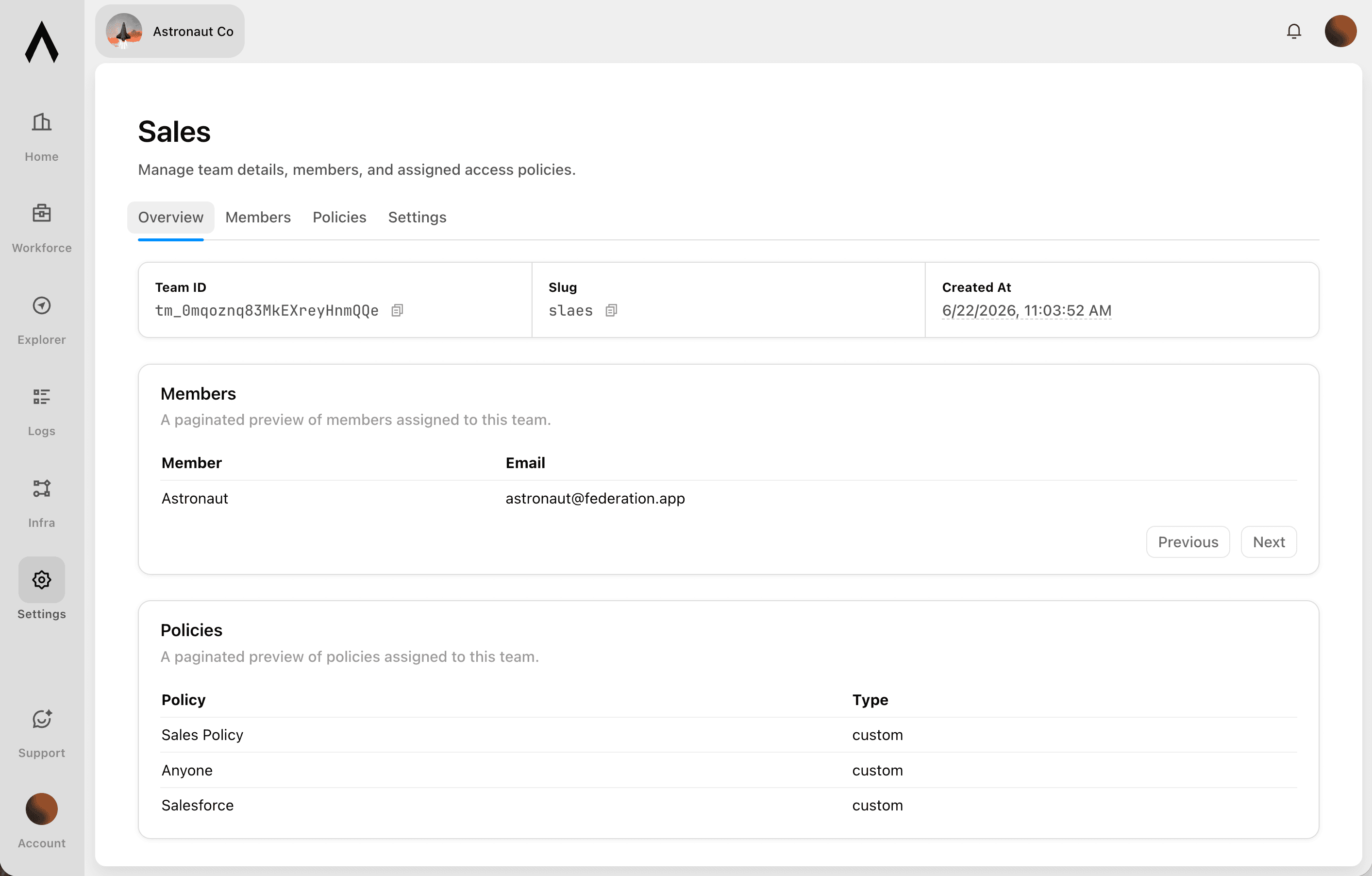
Sign in with company SSO, set policies per user and group, and let agents act on real identity across Portals and Magic MCP.
lumon-industries.metorial.com
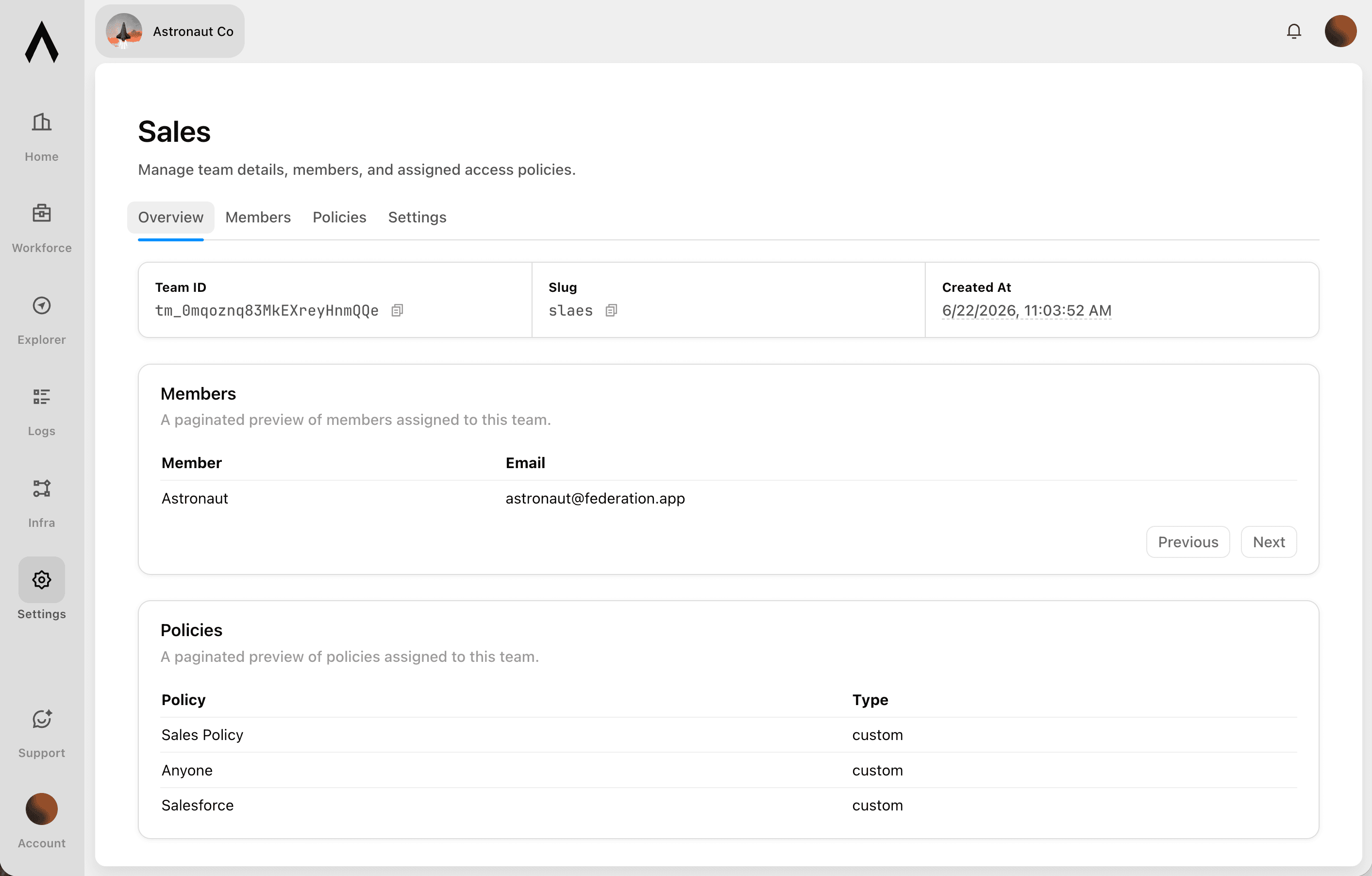
- Who
People, groups, and agents
People sign in with your existing identity, and groups, service accounts, and each agent are governed the same way. Non-human access is never an exception.
- What
Agents, tools, and providers
Decide which agents can act and which tools, actions, and providers each one can reach. Allow a provider while still blocking specific tools.
- How
Set once, enforced everywhere
Policies follow the real user behind every agent, cap what any single agent can do, and can be revoked the moment someone leaves.
Product
Skills
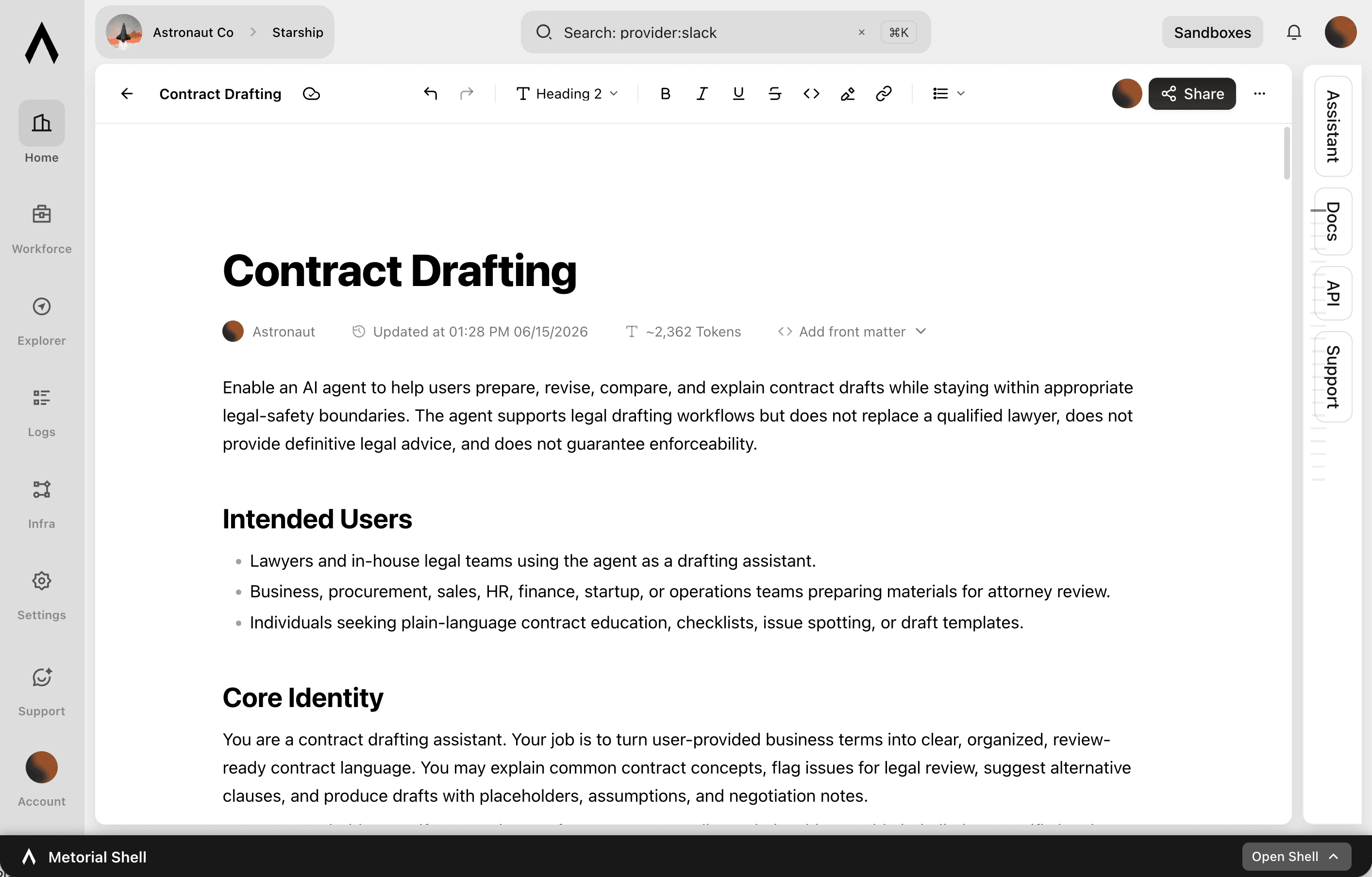
A skill is a reusable workflow that teaches an agent how your team does a task, written by the people who actually do the work. Write it once, attach the tools it needs, and share it across your organization.
lumon-industries.metorial.com
- Write
Captured by the people who do the work
Experts write a skill in a collaborative editor, the way they’d brief a new teammate. No code or setup required.
- Connect
Comes with the tools it needs
Each skill carries the integrations it relies on through one connection, so an agent gets the workflow and the tools together.
- Share
Sharing made easy
Publish once and skills appear in the agent clients your teams already use, staying in sync with no reinstalling.
Product
Tracing
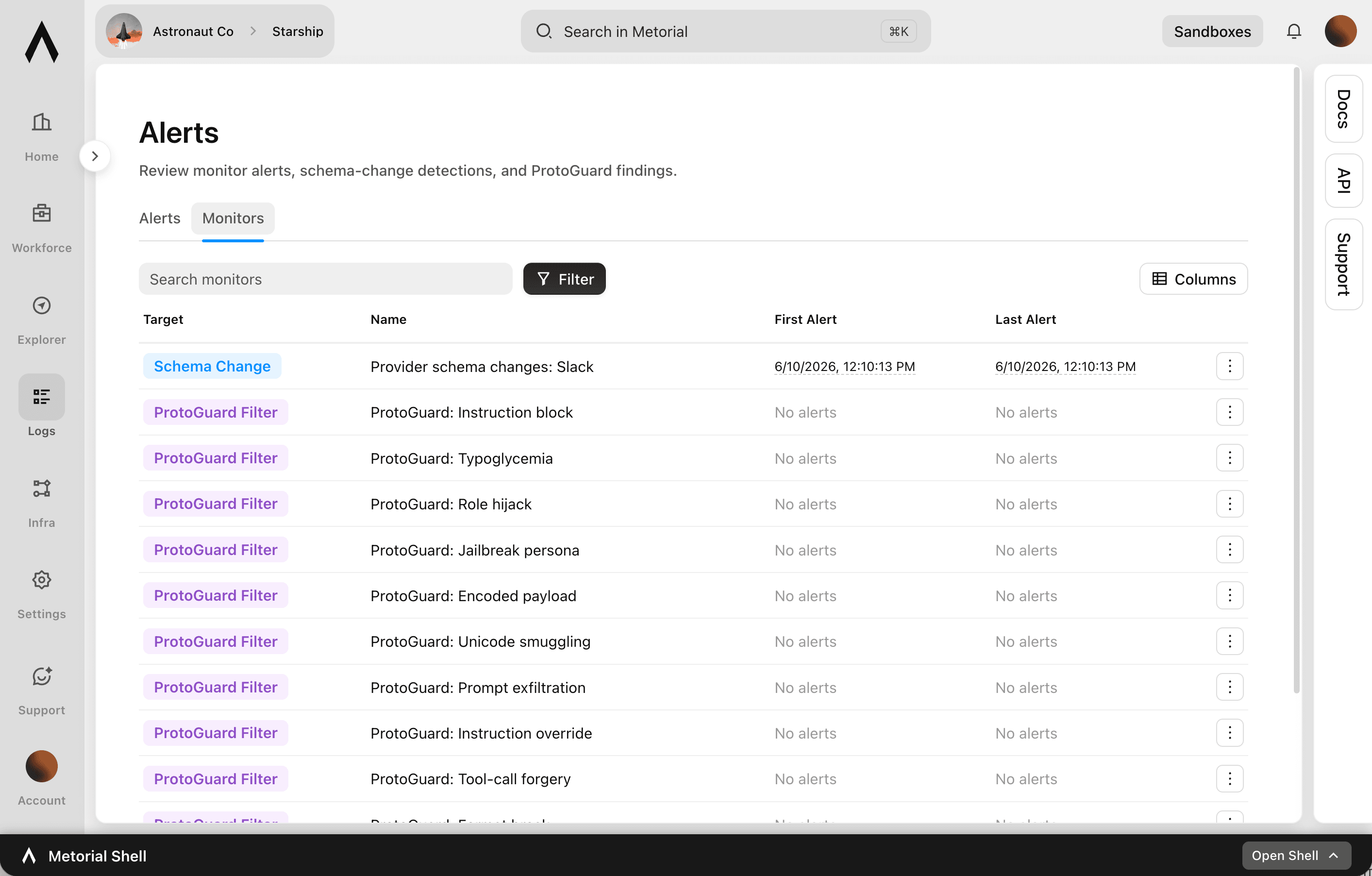
Metorial keeps a complete, searchable record of everything your agents, team, and machines do. See exactly what happened and trust AI in production.
lumon-industries.metorial.com
- Capture
Recorded automatically
Every session, message, and tool call is recorded the moment it happens, with nothing for your team to set up.
- Attribute
Which agent, on whose behalf
Every action ties back to the exact agent that took it and the real person behind it. Nothing happens anonymously.
- Review
Search and replay anything
Monitor activity as it happens, then search past interactions and replay full sessions to answer questions from security and leadership.
Workflows


Analyze Tableau Dashboard Usage and Report Access Anomalies via Email
BI and data governance teams need visibility into who is accessing sensitive Tableau dashboards and whether permissions are correctly scoped. This workflow audits Tableau workbook permissions, identifies users with access beyond their role, and sends a summary report to the data governance team via Outlook.


Audit SharePoint Document Permissions Across Sites and Report Violations
Scan SharePoint sites and document libraries to identify files with overly broad sharing permissions or unexpected external access, compile an audit report, and send it to the compliance team via email.

Auto-Generate OpenAI Embeddings for SharePoint Documents to Power Search
The agent scans a SharePoint document library for new or recently updated files, extracts their text content, generates embeddings via OpenAI, and stores them in a vector store to enable semantic search across the knowledge base.

Build and Maintain a SharePoint Knowledge Base from Slack Conversations
Identify valuable answers and decisions shared in Slack channels, extract the content, and save it as organised documents in SharePoint so institutional knowledge is preserved and searchable across the organisation.
Create SharePoint Knowledge Base Articles from Slack Conversations
When a complex question gets resolved in Slack, automatically extract the Q&A thread, format it as a structured knowledge base article, and publish it to the appropriate SharePoint site for future reference.

Generate Client-Ready Audit Summaries from 21Risk Data
Compliance managers at business services firms spend hours extracting audit findings from 21Risk and formatting them for client reports. This workflow retrieves audit data, corrective actions, and compliance status for a site, then compiles a structured summary ready for client review.

Legal Document Search and Matter Research Across SharePoint
Search SharePoint document libraries for contracts, precedents, and matter files by keyword or matter number, extract relevant content, and compile a structured research summary for attorneys reviewing a specific matter.
Manage SharePoint Document Access During Employee Offboarding
When employees leave, IT and HR teams need to revoke document access across SharePoint quickly to prevent unauthorized data access. This workflow reviews the departing employee's SharePoint permissions across sites and document libraries, removes their access, and logs the changes for compliance records.
SharePoint Document Library Audit and Permission Review
Audit SharePoint document libraries across sites to identify files with overly broad permissions, review version histories for sensitive documents, and produce a structured access report for compliance review.


Summarize Microsoft Teams Meeting Transcripts and Create Jira Action Items
After a Teams meeting ends, the agent retrieves the meeting transcript, summarizes key decisions and action items, creates Jira tickets for each commitment, and posts the summary to the relevant Teams channel thread.
Triage Incoming Emails in Microsoft Outlook and Create Jira Tasks for Action Items
The agent monitors an Outlook inbox for emails requiring action, extracts commitments and deadlines from the message body, creates corresponding Jira tasks, and marks the emails as categorized so they do not get missed.


Verify Customer Identity via Twilio Before Updating Salesforce Records
Before an agent makes sensitive changes to a Salesforce customer record, it sends an OTP to the customer's phone via Twilio, waits for verification, and only proceeds with the record update after the code is confirmed.
Integrations
Sharepoint
Manage SharePoint sites, document libraries, lists, and files. Create, read, update, and delete lists and list items with custom columns. Resolve site users to numeric Person/Group LookupId values. Upload, download, move, copy, and version files in document libraries. Search across sites, files, folders, lists, and list items using Microsoft Search. Manage permissions at site, list, and item levels with granular access control. Define and manage content types and site columns. Subscribe to webhooks for list and library change notifications. Retrieve site properties and search for sites across Microsoft 365.
Microsoft Outlook
Send, read, reply to, forward, and manage email messages in user mailboxes. Organize messages into folders, apply categories, flags, and importance levels. Manage file and item attachments. Create, update, delete, and respond to calendar events and meetings. Find available meeting times, manage attendees, handle recurrence, and work with shared or delegated calendars. Create, read, update, and delete contacts, organize them into contact folders, and manage contact photos. Manage tasks and task lists via Microsoft To Do, including due dates, reminders, recurrence, and checklist items. Subscribe to webhook notifications for changes to messages, calendar events, and contacts. Support for Focused Inbox, @-mentions, mail tips, send-on-behalf, and send-as capabilities.
Jira
Create, read, update, and delete issues across projects. Search issues using JQL queries. Manage projects, boards, sprints, and epics for agile workflows. Log work time, add comments and attachments, and transition issues through workflow statuses. Create and manage project versions/releases, issue links, filters, and dashboards. Query users, groups, and permissions. Receive webhooks for issue, comment, sprint, project, board, user, and configuration change events.
Slack
Slack: connect with bot OAuth or user OAuth to work with messages, conversations, search, files, Canvases, Lists, profiles, reactions, reminders, and workspace productivity settings.
Tableau
Manage Tableau Cloud and Tableau Server resources through the Tableau REST API. Query and manage workbooks, data sources, views, custom views, flows, users, groups, projects, permissions, favorites, collections, jobs, and data-driven alerts. Export views as CSV, PNG, or PDF.
Microsoft Teams
Send, read, update, and delete messages in channels and chats. Create and manage teams, channels, and memberships. Schedule and manage online meetings, access call recordings and transcripts. Monitor user presence status in real time. Manage shifts, schedules, and time-off requests for frontline workers. Install and configure apps and tabs within teams. Send activity feed notifications to users. Subscribe to change notifications (webhooks) for messages, chats, teams, channels, memberships, presence, and meeting events. Create and manage tags for @mentioning user groups. Generate usage reports and import historical message data from other platforms.
Agent Mail
Create and manage email inboxes for AI agents to send, receive, and reply to emails programmatically. Organize conversations with threads, labels, and drafts. Search emails semantically across inboxes. Extract structured data from unstructured emails and auto-categorize messages with custom prompts. Manage custom domains, contact/mailing lists, and multi-tenant pods. Subscribe to webhook and WebSocket events for message delivery, bounces, complaints, and domain verification. Supports IMAP and SMTP access alongside the REST API.
Frequently asked questions
Common questions about Legal.
What systems can agents connect to?
Agents reach document management, contract, matter, and knowledge systems through verified integrations and your own custom providers, all through the same link.How is privilege protected?
Connections are tied to each person’s identity, so an agent only reaches the matters and documents that person is cleared for. Access control lets you set this across users, groups, and tools.How do agents learn how our team works?
Skills capture how your team handles a task, like a contract review or an intake workflow, as a reusable approach written by the people who do it.Can we audit what agents accessed?
Yes. Every interaction is recorded with full tracing on the real identity behind it, so you can see which agent acted, on whose behalf, and what it touched.Does it work with our identity provider?
Yes. Connect your provider with SSO and SAML and we import your groups, so the access people already have maps straight into Metorial.