Moonfire
Share your team’s knowledge with AI agents
Capture how your team does a task as a skill, written by the people who do the work, and connect agents to the docs, tools, and data where work already lives. Every agent follows the same approach, and only sees what the person behind it is allowed to reach.
Solutions
Capture how your team does a task as a skill, written by the people who do the work, and connect agents to the docs, tools, and data where work already lives. Every agent follows the same approach, and only sees what the person behind it is allowed to reach.
- 01
Skills written by the people who do the work
A skill captures how your team does a task as a reusable workflow, with the tools it needs attached. Share it once and every agent that needs it follows the same approach, instead of each person solving it from scratch.
- 02
Knowledge stays where it lives
Connect agents to the documentation, wikis, and collaboration tools your team already uses. Nothing is copied into a separate store, so answers stay current and there is no second source of truth to maintain.
- 03
Access follows the person
Agents act on the real identity of whoever is using them, so they only surface knowledge and tools that person can already reach. No manual permission lists, and no agent that knows more than it should.
- 04
One link to get started
People sign in with company SSO and connect their agent through a single Magic MCP link — no tokens to copy and no code to write. Teams connect to a portal of approved skills and tools the same way.
Capture how your team works
A skill is a reusable workflow, written by the people who actually do the task. Write it once, attach the tools it needs, and every agent that uses it follows the same approach.
Reach knowledge where it lives
Point agents at the docs, wikis, collaboration tools, and data sources your team already uses — no copying knowledge into a separate store that drifts out of date.
Only what each person can see
Agents act on the real identity of the person behind them, so they surface only the knowledge and tools that person is already allowed to reach.
Customer stories

Solution
Metorial for Workforce
Connect agents to your real systems, share the knowledge that makes them helpful, and keep every action governed and visible, no tokens or code required.
lumon-industries.metorial.com
- Connect
Agents reach the systems where work happens
Give teams access to agents that can use business tools, data sources, and enterprise systems through governed integrations and MCP-compatible providers.
- Govern
Access follows users and teams
Apply policies across users, groups, providers, and tools so agents act with the right permissions instead of unmanaged shared credentials.
- Observe
Every interaction is traceable
See which agent acted, which user authorized it, which tool was called, and what happened, so AI adoption stays visible to security and operations teams.
Product
Portals
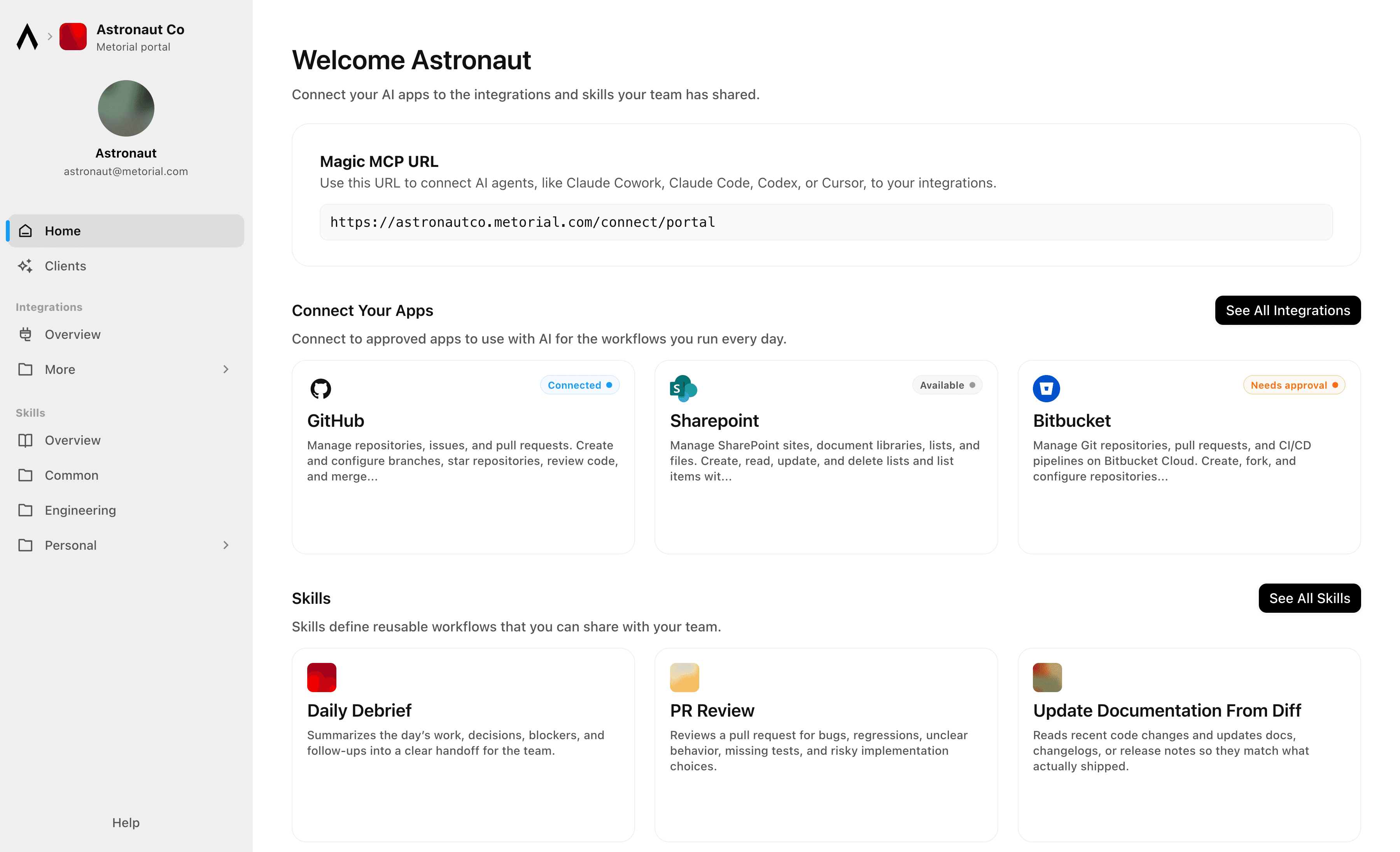
Metorial Portals lets employees connect AI agents to the integrations and skills your company already uses. People sign in with company SSO and connect through one Magic MCP URL. Admins decide who gets access to what.
lumon-industries.metorial.com
- Browse
A catalog of approved tools and skills
Employees open Metorial Portals to find the integrations and skills your company approved, in one familiar place, with no setup to figure out.
- Connect
One link to start working
People connect their agent through a single Magic MCP URL and sign in with the company login they already have, with no tokens to manage.
- Govern
Each person sees only what they should
Access groups and policies decide which tools and skills appear for each person, and people can request more when they need it.
Product
Skills
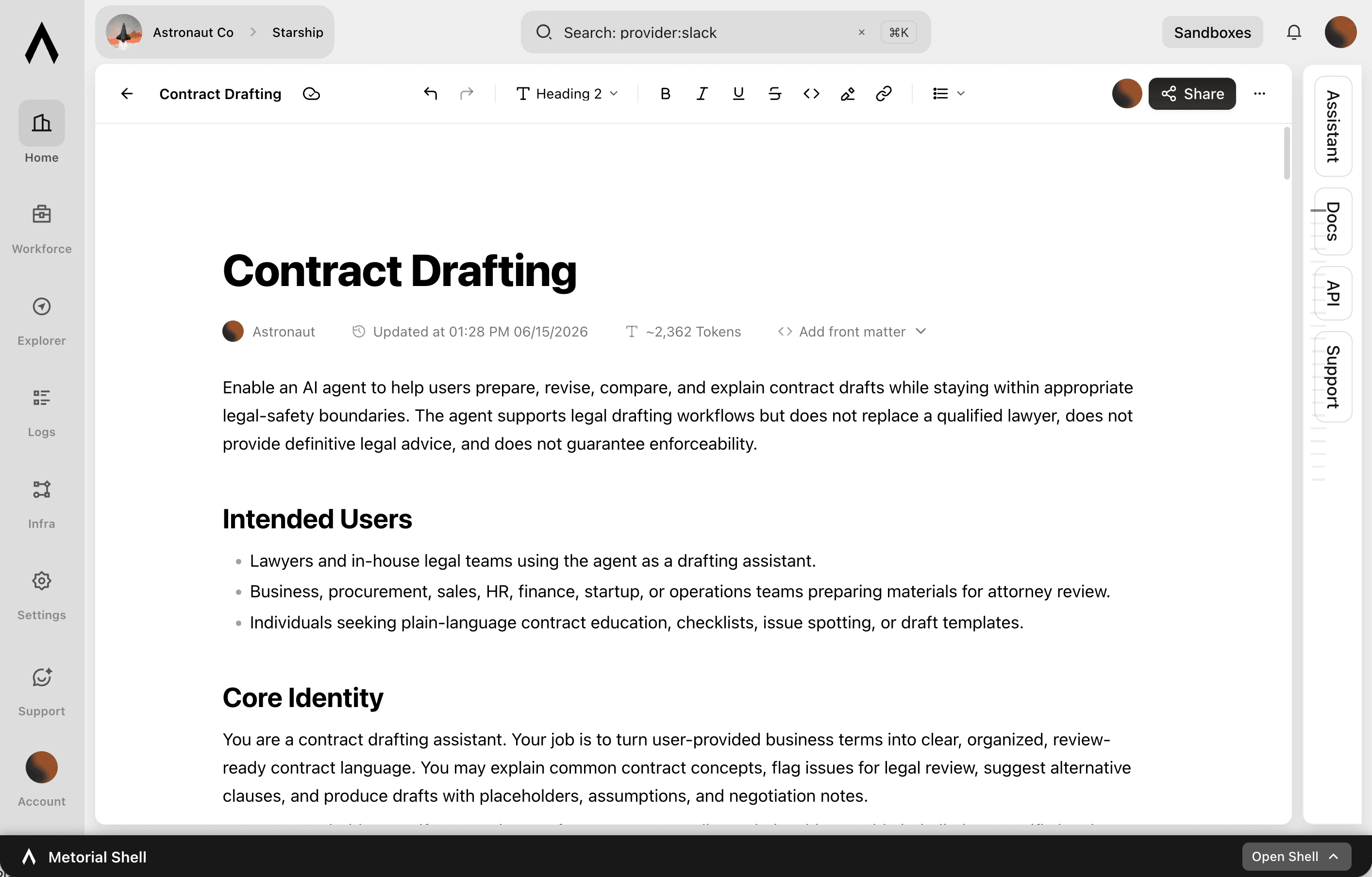
A skill is a reusable workflow that teaches an agent how your team does a task, written by the people who actually do the work. Write it once, attach the tools it needs, and share it across your organization.
lumon-industries.metorial.com
- Write
Captured by the people who do the work
Experts write a skill in a collaborative editor, the way they’d brief a new teammate. No code or setup required.
- Connect
Comes with the tools it needs
Each skill carries the integrations it relies on through one connection, so an agent gets the workflow and the tools together.
- Share
Sharing made easy
Publish once and skills appear in the agent clients your teams already use, staying in sync with no reinstalling.
Workflows


Aggregate Compliance Audit Findings and Notify Responsible Teams
Pull overdue corrective actions and non-compliant audit findings from 21 Risk, then route notifications to the responsible site teams via Slack so issues are acted on promptly.

Aggregate Customer Health Signals from Salesforce and Slack for Success Reviews
Customer success managers prepare for quarterly business reviews by manually pulling together account data from multiple sources. This workflow queries Salesforce for account and opportunity data, searches Slack for recent customer mentions, and compiles a health summary ready for the QBR meeting.

Asana Project Kickoff from Salesforce Won Opportunity
When a Salesforce opportunity is marked closed-won, automatically create a structured Asana project with standard delivery sections and tasks, assign team members, and notify the delivery team so work can start without manual handoff.


Audit SharePoint Document Permissions Across Sites and Report Violations
Scan SharePoint sites and document libraries to identify files with overly broad sharing permissions or unexpected external access, compile an audit report, and send it to the compliance team via email.

Auto-Generate OpenAI Embeddings for SharePoint Documents to Power Search
The agent scans a SharePoint document library for new or recently updated files, extracts their text content, generates embeddings via OpenAI, and stores them in a vector store to enable semantic search across the knowledge base.


Automate Client Appointment Reminders via Acuity and Gmail
Service businesses with high appointment volumes see no-show rates climb when reminder workflows are manual or inconsistent. This workflow checks upcoming Acuity appointments, reviews each client record, and sends personalized reminder emails via Gmail with appointment details and any required preparation instructions.

Automate HubSpot Ticket Creation from Agent Mail Inbound Emails
When support emails arrive in an Agent Mail inbox, extract key details, check for existing HubSpot contacts, create a support ticket, and send an automated acknowledgment reply—all without human triage.

Automate Salesforce Opportunity Updates from Email Conversations
Revenue teams lose deal context when key email exchanges never make it back to Salesforce. This workflow searches Outlook for recent email threads related to open opportunities, summarizes the key developments, and updates the corresponding Salesforce opportunity records to keep the CRM accurate.


Automate Shopify Order Fulfillment Alerts via Twilio SMS
When Shopify orders meet specific criteria—high value, specific product type, or delayed fulfillment—send automated SMS alerts to the operations team via Twilio so nothing falls through the cracks.
Integrations
Slack
Slack: connect with bot OAuth or user OAuth to work with messages, conversations, search, files, Canvases, Lists, profiles, reactions, reminders, and workspace productivity settings.
Hubspot
Create, read, update, and delete CRM objects including contacts, companies, deals, tickets, and custom objects. Manage associations between CRM records. Track engagements such as calls, emails, meetings, notes, and tasks. Send transactional and marketing emails, manage campaigns, and handle subscription preferences. Build and manage marketing workflows, sequences, and automation actions. Manage CMS content including blog posts, landing pages, and HubDB tables. Handle commerce data including products, orders, invoices, quotes, and payments. Create and manage contact lists for segmentation. Configure deal, ticket, and order pipelines with custom stages. Search and filter CRM records. Bulk import and export CRM data. Manage users, teams, and account settings. Subscribe to webhooks for real-time notifications on object creation, deletion, property changes, merges, and association changes.

Metorial Search
Search the web and fetch readable content from selected pages. Built for fast discovery and content extraction.
Sharepoint
Manage SharePoint sites, document libraries, lists, and files. Create, read, update, and delete lists and list items with custom columns. Resolve site users to numeric Person/Group LookupId values. Upload, download, move, copy, and version files in document libraries. Search across sites, files, folders, lists, and list items using Microsoft Search. Manage permissions at site, list, and item levels with granular access control. Define and manage content types and site columns. Subscribe to webhooks for list and library change notifications. Retrieve site properties and search for sites across Microsoft 365.
Salesforce
Manage CRM data including Accounts, Contacts, Leads, Opportunities, Cases, and custom objects. Create, read, update, and delete records. Query data using SOQL and search across objects using SOSL. Perform bulk data operations for large-scale imports, exports, and migrations. Execute composite requests to batch multiple operations in a single API call. Access analytics, reports, and dashboards. Manage files and attachments associated with records. Interact with Chatter feeds, posts, and groups for social collaboration. Subscribe to real-time change events via Change Data Capture and Platform Events. Manage org metadata including custom objects, fields, layouts, and workflows. Query data using GraphQL for precise data retrieval across related objects.
Agent Mail
Create and manage email inboxes for AI agents to send, receive, and reply to emails programmatically. Organize conversations with threads, labels, and drafts. Search emails semantically across inboxes. Extract structured data from unstructured emails and auto-categorize messages with custom prompts. Manage custom domains, contact/mailing lists, and multi-tenant pods. Subscribe to webhook and WebSocket events for message delivery, bounces, complaints, and domain verification. Supports IMAP and SMTP access alongside the REST API.
Frequently asked questions
Common questions about AI knowledge sharing.
How do agents learn how our team works?
Skills capture how your team does a task as a reusable workflow, written by the people who do the work. Write it once, attach the tools it needs, and every agent that uses it follows the same approach.Does Metorial copy our knowledge into a new store?
No. Agents connect to the docs, wikis, and tools where your knowledge already lives through integrations. Knowledge stays in its source system, so it stays current and there is nothing extra to maintain.Can an agent see things the person using it cannot?
No. Agents act on the real identity of the person behind them, so they only reach knowledge and tools that person is already allowed to use. Portals give each team a catalog of approved skills and tools they connect to with one sign-in.