Crunched
Use cases
Metorial connects agents to real tools through one API, SDKs, and a CLI, with access, identity, and tracing built in. Connect your own team just as fast, with company SSO and one Magic MCP link.
- 01
Ship features faster
Connect agents to tools through ready-made integrations and MCP-compatible providers, so engineers spend time on product, not plumbing.
- 02
Get your own team on agents
People sign in with company SSO and connect through one link, so the team adopts agents as easily as your customers will.
- 03
Production controls from the start
Access policies and tracing are built in, so AI features grow into customer-ready infrastructure without rework.
- 04
Answer security questions early
Show how agent access is governed and traced when customers ask how your AI touches their systems, without scrambling.
Connect agents to real tools fast
Use the API, SDKs, CLI, and 1000+ verified integrations plus your own custom providers instead of hand-building every connector.
Your team connects in one step
People sign in with company SSO and connect through one Magic MCP link, with no tokens to manage and no code to write. Access is tied to each person’s identity.
Production controls from day one
Access control and tracing come standard, so you can answer customer security questions without retrofitting later.
Customer stories

Solution
Metorial for Developers
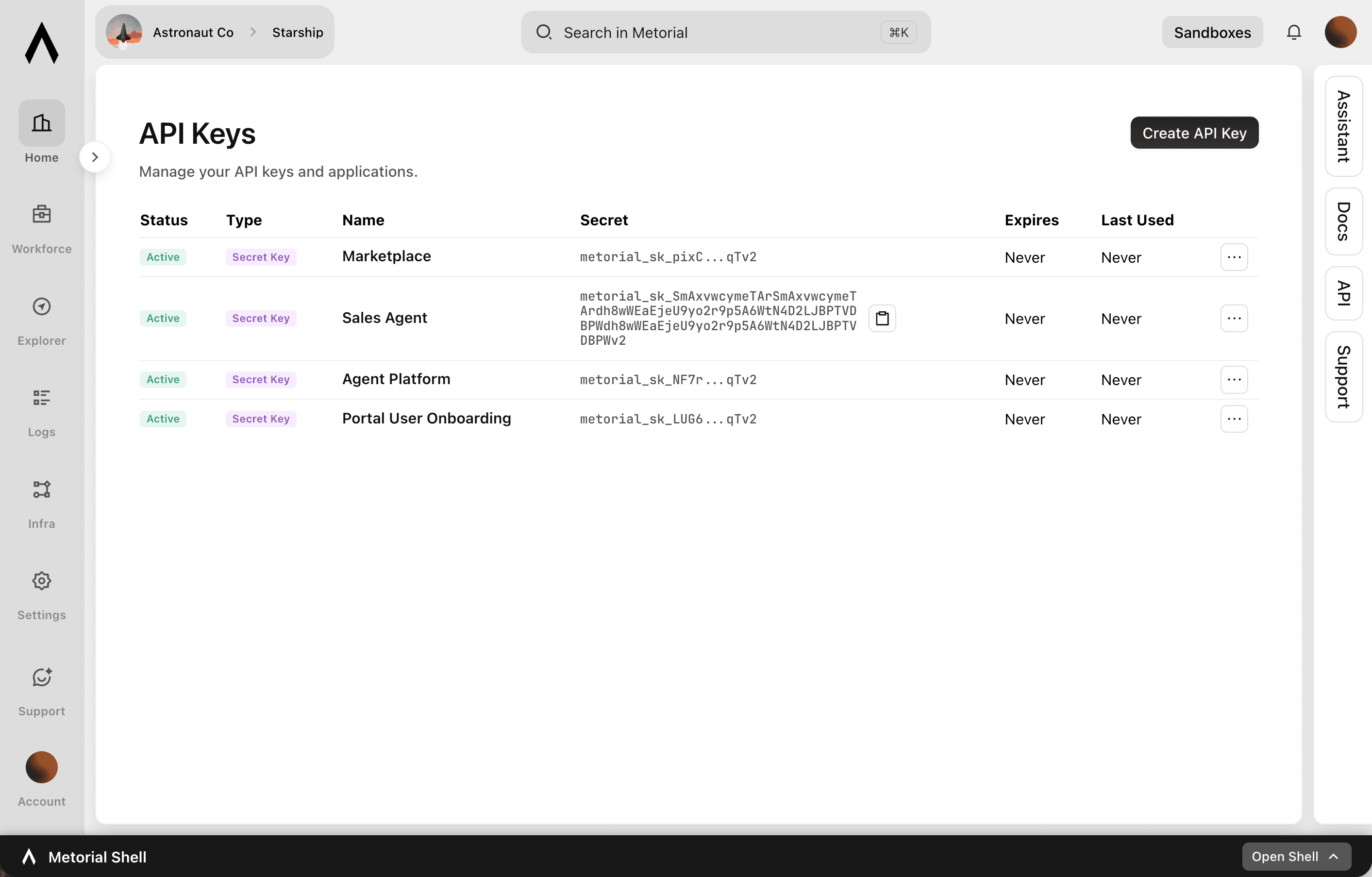
Connect agents to real tools with the Metorial API, SDKs, and CLI. Access control, identity, and tracing are built in, so you ship to production without hand-rolling the parts around your agent.
lumon-industries.metorial.com
- Build
Use standard developer workflows
Work with APIs, SDKs, CLI commands, and provider definitions instead of hand-building every integration and control surface.
- Connect
Attach agents to real tools
Use ready-made integrations, custom providers, and MCP-compatible access patterns to give agents useful capabilities.
- Operate
Debug and govern from day one
Trace tool calls, review access decisions, and keep agent activity observable as prototypes move into production.
Solution
Metorial for Workforce
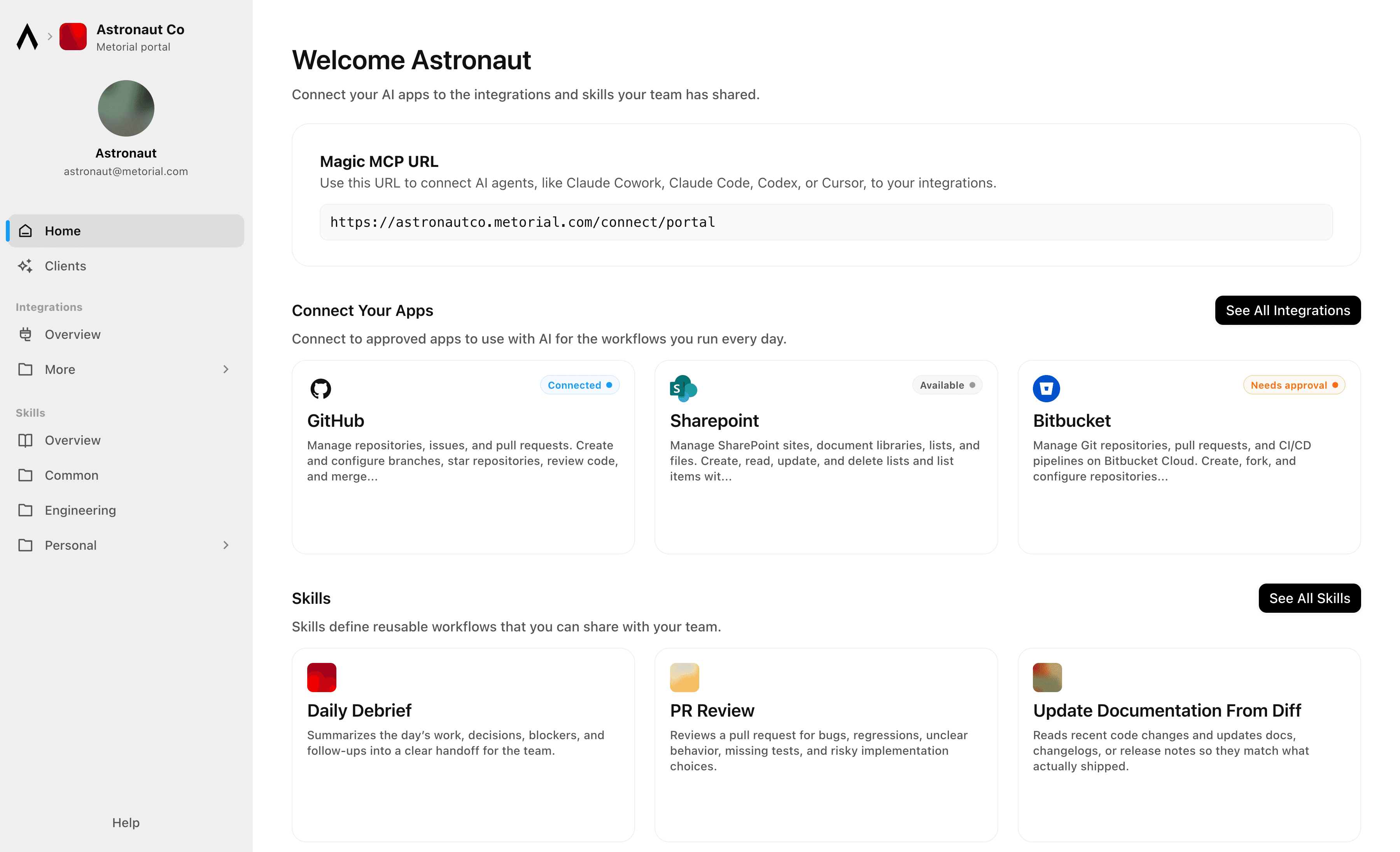
Connect agents to your real systems, share the knowledge that makes them helpful, and keep every action governed and visible, no tokens or code required.
lumon-industries.metorial.com
- Connect
Agents reach the systems where work happens
Give teams access to agents that can use business tools, data sources, and enterprise systems through governed integrations and MCP-compatible providers.
- Govern
Access follows users and teams
Apply policies across users, groups, providers, and tools so agents act with the right permissions instead of unmanaged shared credentials.
- Observe
Every interaction is traceable
See which agent acted, which user authorized it, which tool was called, and what happened, so AI adoption stays visible to security and operations teams.
Product
Magic MCP
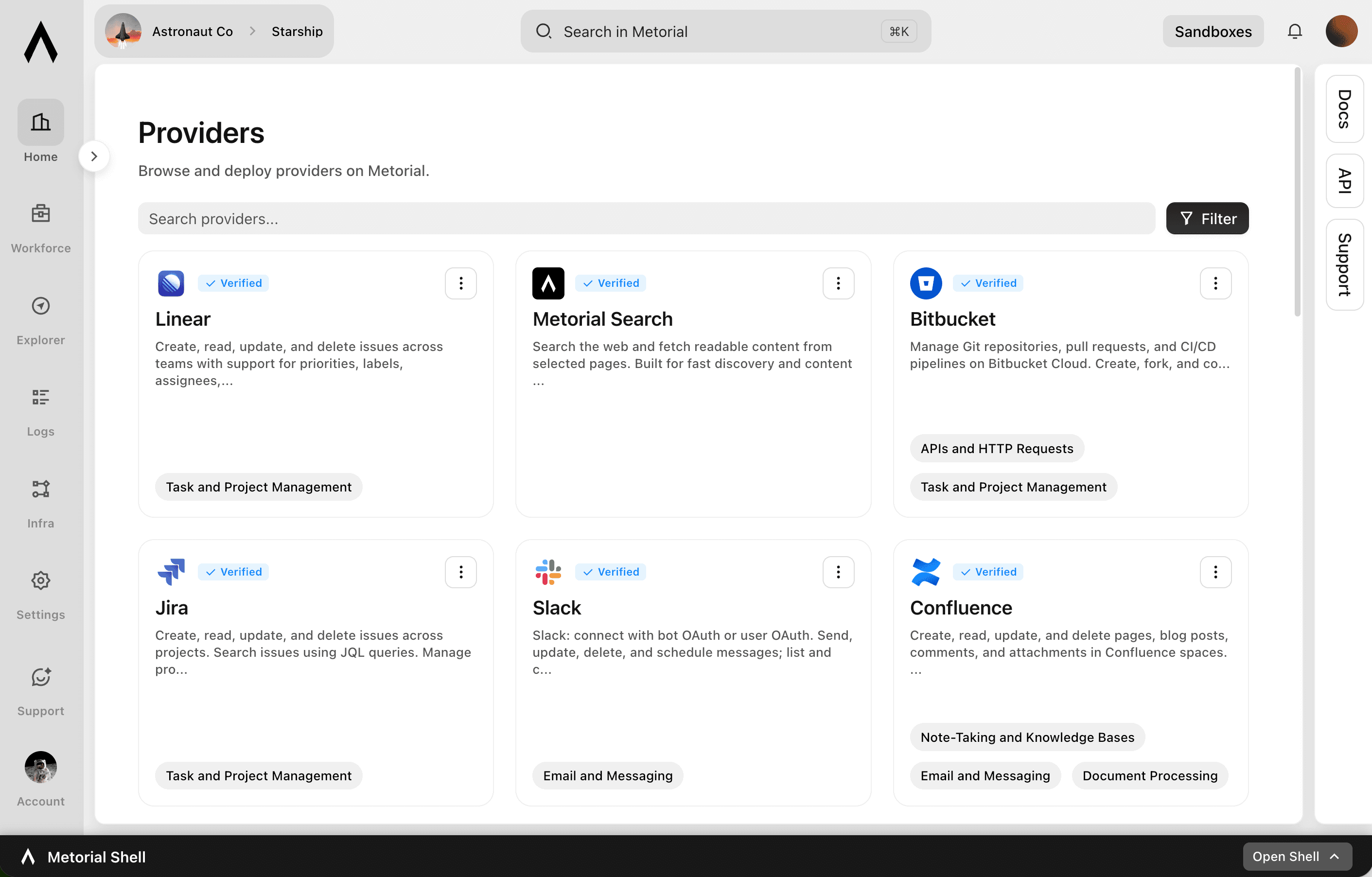
Magic MCP is a single URL you paste into your AI client. Sign in with the login you already use, and your agent reaches every integration and tool you allow it to use.
lumon-industries.metorial.com
- One URL
Paste one link into any agent
Drop a single Magic MCP URL into any MCP-compatible client. Nothing to install and no integration to wire up tool by tool.
- Every tool
1000+ integrations, plus your own
The same link reaches a growing catalog of verified integrations and the custom or remote MCP servers only your team has, kept current for you.
- Your access
Only what you allow, never more
Sign in with the identity you already use and stay tokenless. Behind the link, every call runs on the real user and reaches only the tools they’re allowed.
Product
Integrations
Start from 1000+ verified integrations or add your own, and give every one a governed path to your agents under existing SSO and access policies.
lumon-industries.metorial.com
- Connect
Any tool, ours or yours
Start with 1000+ verified integrations or add the internal systems and private APIs only your team has as custom, remote, or Docker-based providers.
- Reach
One link for every approved tool
Agents reach the integrations they’re allowed to use through a single connection, with no connector project per tool.
- Govern
Scoped and traceable by default
Access follows the groups and policies you already manage, down to individual tools and actions, and every call stays on the record.
Product
CLI
Let agents use the CLI for native integration work. Skip unnecessary tool schema overhead.
- Connect
Set up an integration in minutes
Install the CLI, sign in, and connect a provider, then list its tools and inspect each one, all from the terminal.
- Call
Run tools as commands
Agents use commands, flags, and help text they already understand, with no large tool schema to load before they can act.
- Automate
The same workflow anywhere
Run integration work locally, in scripts, and in CI, so it fits the automation your team already has.
Product
Portals
Metorial Portals lets employees connect AI agents to the integrations and skills your company already uses. People sign in with company SSO and connect through one Magic MCP URL. Admins decide who gets access to what.
lumon-industries.metorial.com
- Browse
A catalog of approved tools and skills
Employees open Metorial Portals to find the integrations and skills your company approved, in one familiar place, with no setup to figure out.
- Connect
One link to start working
People connect their agent through a single Magic MCP URL and sign in with the company login they already have, with no tokens to manage.
- Govern
Each person sees only what they should
Access groups and policies decide which tools and skills appear for each person, and people can request more when they need it.
Workflows

1Password Credential Rotation and Vault Audit for Engineering Teams
Audit 1Password vaults for stale or overly shared credentials, generate new secure passwords for service accounts, update the relevant vault items, and log all changes to maintain a clean secrets hygiene record.


App Store Review Monitoring and GitHub Issue Triage
Monitor Google Play app reviews for negative feedback patterns, search GitHub for related known issues, create new issues for untracked problems, and notify the product team in Slack with a weekly review digest.


Automate HubSpot Ticket Creation from Agent Mail Inbound Emails
When support emails arrive in an Agent Mail inbox, extract key details, check for existing HubSpot contacts, create a support ticket, and send an automated acknowledgment reply—all without human triage.

Automate PR Review Requests from Linear Issues to GitHub
Engineering teams lose time manually creating GitHub pull requests and linking them back to Linear issues. This workflow reads in-progress Linear issues, checks for associated GitHub branches or PRs, and posts review request reminders to Slack when PRs have been open without review for too long.


Bitbucket Pipeline Failure Triage and Issue Creation
When a Bitbucket Pipeline fails, identify the failing step, search for related recent commits, create a Bitbucket issue for the failure, and notify the responsible developer via Microsoft Teams.

Bug Triage from Sentry Errors to GitHub Issues
Monitor Sentry for new critical errors, deduplicate against existing GitHub issues, and automatically open well-structured bug reports with stack trace context so engineers can act immediately without switching between tools.


Classify and Route Typeform Survey Responses into Jira Issues
When customer feedback surveys are submitted via Typeform, the agent reads and classifies responses by theme (bug, feature request, complaint), then creates appropriately labeled Jira issues routed to the right team.


Competitive Intelligence Research and Slack Briefing
Automatically search the web for competitor news, product updates, and pricing changes, then deliver a structured competitive intelligence briefing to the relevant Slack channel so GTM teams stay informed without manual research.
Compile Competitive Intelligence Reports Using Web Research
Product and marketing teams need regular competitive intelligence but manual research across competitor websites, press releases, and review sites is time-consuming. This workflow searches for recent competitor updates, extracts structured content from key pages, and compiles a digest that can be shared with the team.
Compile Weekly Engineering Sprint Reports from Linear and GitHub
At the end of each sprint, automatically gather completed Linear issues, associated pull requests, and deployment activity from GitHub to produce a structured sprint summary for stakeholders.
Compile Weekly Sprint Reports from Linear and Post to Slack
Engineering managers spend significant time assembling sprint status updates from Linear data and distributing them to stakeholders. This workflow pulls current cycle data from Linear, summarizes issue progress by state and assignee, and posts a formatted weekly report to the appropriate Slack channel.
Create Typeform Intake Forms Dynamically Based on HubSpot Deal Properties
When a new deal reaches a specific stage in HubSpot, the agent reads the deal's product and tier details, dynamically creates a customized Typeform intake questionnaire tailored to that deal, and sends the form link to the contact via a HubSpot note.

Discord Community Moderation and Engagement Monitoring
Monitor Discord server activity for moderation events and engagement trends, automatically enforce content rules using auto-moderation, and post weekly community health summaries to a moderator channel to support community operations at scale.
Discord Community Moderation and Incident Response
Monitor a Discord server for moderation incidents, automatically apply or escalate moderation actions based on severity, create a thread for tracking, and notify the moderation team with context.

Distribute Figma Design Handoffs to Developers via Linear and Slack
Design-to-development handoffs often break down when developers don't know when designs are ready or where to find them. This workflow reads finalized Figma components, creates Linear issues with exported asset links, and notifies the development team in Slack so implementation can begin immediately.
Integrations
GitHub
Manage repositories, issues, and pull requests. Create and configure branches, star repositories, review code, and merge changes. Automate CI/CD workflows with GitHub Actions, manage workflow runs, secrets, and artifacts. Track issues with labels, milestones, and assignees. Search across code, repositories, issues, and users. Manage organizations, teams, and memberships. Create and manage projects, gists, packages, deployments, and environments. Access security alerts including code scanning, secret scanning, and Dependabot alerts. Read and write file contents in repositories. Manage webhooks, notifications, and codespaces.
Slack
Slack: connect with bot OAuth or user OAuth to work with messages, conversations, search, files, Canvases, Lists, profiles, reactions, reminders, and workspace productivity settings.
Linear
Create, read, update, and delete issues across teams with support for priorities, labels, assignees, due dates, and workflow states. Manage projects that group related issues, and organize work into time-boxed cycles (sprints). Create and manage documents, comments, and file attachments. Search issues using vector similarity or rich filters. Configure teams, workflow states, and labels. Track customers and link them to issues. Subscribe to real-time webhooks for changes to issues, projects, cycles, comments, documents, and more.
Hubspot
Create, read, update, and delete CRM objects including contacts, companies, deals, tickets, and custom objects. Manage associations between CRM records. Track engagements such as calls, emails, meetings, notes, and tasks. Send transactional and marketing emails, manage campaigns, and handle subscription preferences. Build and manage marketing workflows, sequences, and automation actions. Manage CMS content including blog posts, landing pages, and HubDB tables. Handle commerce data including products, orders, invoices, quotes, and payments. Create and manage contact lists for segmentation. Configure deal, ticket, and order pipelines with custom stages. Search and filter CRM records. Bulk import and export CRM data. Manage users, teams, and account settings. Subscribe to webhooks for real-time notifications on object creation, deletion, property changes, merges, and association changes.
Sentry
Track, manage, and resolve application errors and performance issues. List, query, and bulk-update issues and error events with filters like status, assignment, and tags. Create and manage releases, associate commits, and upload source maps. Configure issue alert rules and metric alert rules with notification actions. Set up cron monitors to detect missed or failed scheduled jobs. Build custom dashboards with configurable widgets. Run ad-hoc Discover queries across errors and transactions for performance analysis. Manage organizations, teams, projects, and members. Provision users via SCIM. Access session replay data. Receive webhooks for issues, errors, alerts, comments, and installation events.

Twilio
Send and receive SMS, MMS, WhatsApp, and RCS messages. Make, receive, and monitor phone calls with programmable call control. Verify user identities via OTP, TOTP, and silent network authentication. Look up phone number intelligence including carrier, line type, caller name, and SIM swap detection. Manage multi-channel conversations across chat, SMS, and WhatsApp. Search for and purchase phone numbers, configure voice and messaging endpoints, schedule messages for future delivery, and inspect call recording metadata.
Frequently asked questions
Common questions about Startups.
Why use Metorial instead of building connectors?
You get 1000+ verified integrations, your own custom providers, an API, SDKs, and a CLI, with access control and tracing already built in, so you focus on product.How do agents connect to tools?
Through Magic MCP, one link gives an agent every tool it is allowed to use. Your own team connects the same way after signing in with company SSO.Can an agent reach more than the person using it?
No. Connections are tied to the person’s identity, so an agent only ever reaches what that person can. Access control lets you scope this per user and tool.Will it hold up in customer security reviews?
Yes. Tracing and SSO and SAML are in place from day one, so you can answer how agents use customer systems without retrofitting controls.