Make agents work for hardware teams

Metorial connects AI agents to the support, supply chain, engineering, and field systems hardware teams run on. People sign in with company SSO and connect through one Magic MCP link, with no tokens or code.

Use cases

Metorial connects AI agents to the support, supply chain, engineering, and field systems hardware teams run on. People sign in with company SSO and connect through one Magic MCP link, with no tokens or code.

  1. 01

    Field support

    Agents retrieve device history, diagnostics, and service records so support teams resolve issues faster without hunting across systems.

  2. 02

    Supply chain operations

    Agents query logistics, procurement, and inventory systems to surface status and flag blockers before they delay shipments or production.

  3. 03

    Engineering triage

    Agents search issue trackers, device logs, and knowledge bases so engineers have the full context of a problem before diagnosing it.

  4. 04

    Customer escalations

    Agents assemble the full picture of an issue across support, engineering, and field systems before escalation, cutting back-and-forth for customers.

Agents reach your operational systems

Give agents access to support, logistics, engineering, device, and ticketing systems through verified integrations and your own custom providers.

People connect in one step

Sign in with company SSO and connect through one Magic MCP link, with no tokens to manage and no code to write. Access is tied to each person’s identity.

One layer for every tool

Internal engineering platforms and off-the-shelf tools reach agents the same way, with every tool call traced.

Solution

Connect agents to your real systems, share the knowledge that makes them helpful, and keep every action governed and visible, no tokens or code required.

lumon-industries.metorial.com
The Metorial Workforce console showing teams, agents, connected tools, and access policies.
  1. Connect

    Agents reach the systems where work happens

    Give teams access to agents that can use business tools, data sources, and enterprise systems through governed integrations and MCP-compatible providers.

  2. Govern

    Access follows users and teams

    Apply policies across users, groups, providers, and tools so agents act with the right permissions instead of unmanaged shared credentials.

  3. Observe

    Every interaction is traceable

    See which agent acted, which user authorized it, which tool was called, and what happened, so AI adoption stays visible to security and operations teams.
Solution

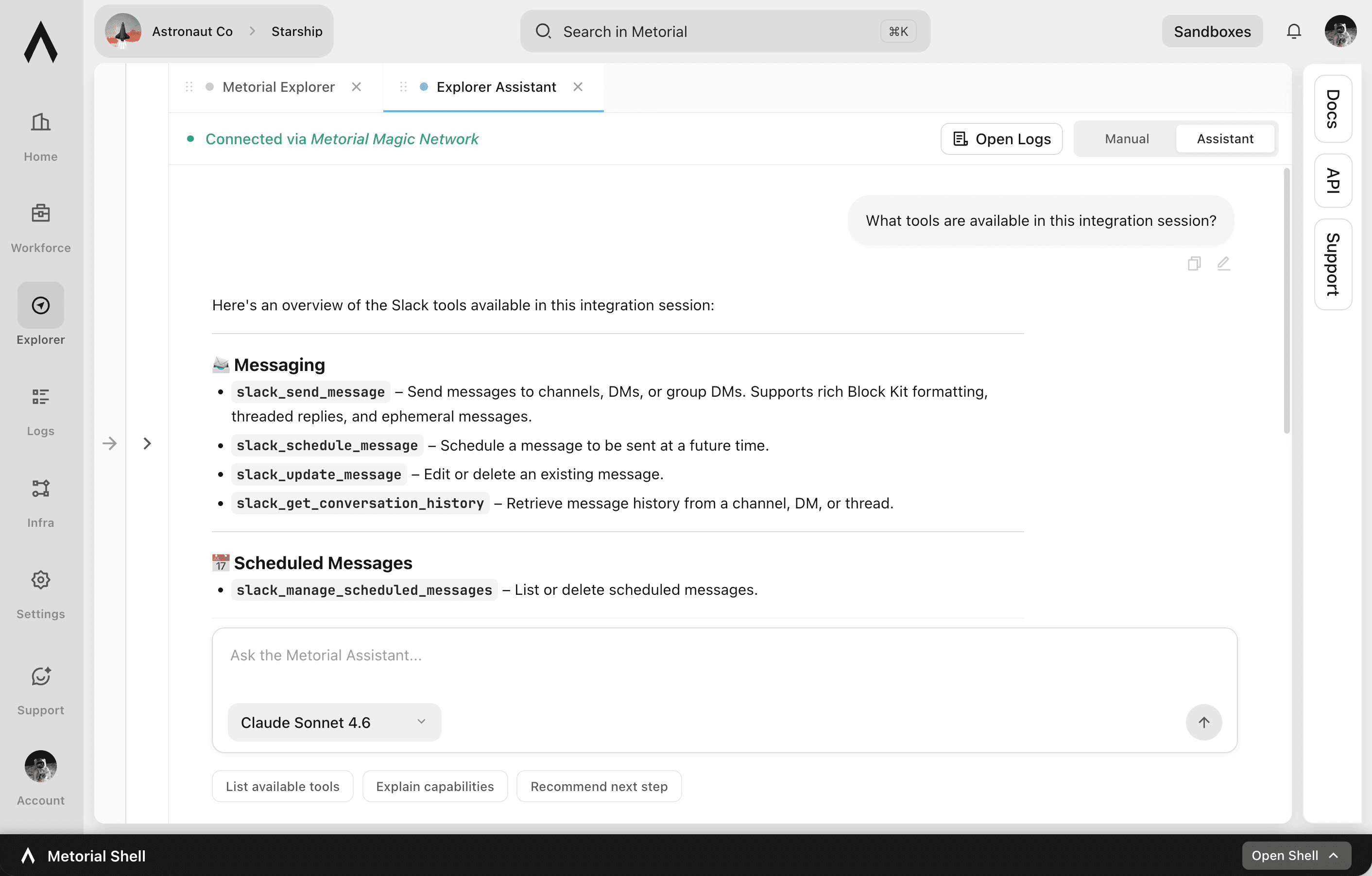
Codex, Claude Code, Cursor, and any other agent can reach the systems your teams already use. Metorial handles the connections, the access, and the visibility, so you do not have to build them yourself.

lumon-industries.metorial.com
The Metorial agent access console showing providers, tool calls, and traces.
  1. Connect

    Reach the tools agents need

    Point an agent at Metorial and it can use 1,000 validated integrations, custom providers, and internal systems through one governed layer.

  2. Control

    Limit what agents can do

    Define access policies around users, groups, tools, and providers so each agent gets the right level of access.

  3. Trace

    Understand every tool call

    Record agent actions, tool inputs, provider responses, and downstream effects for debugging, audits, and operational visibility.

Product

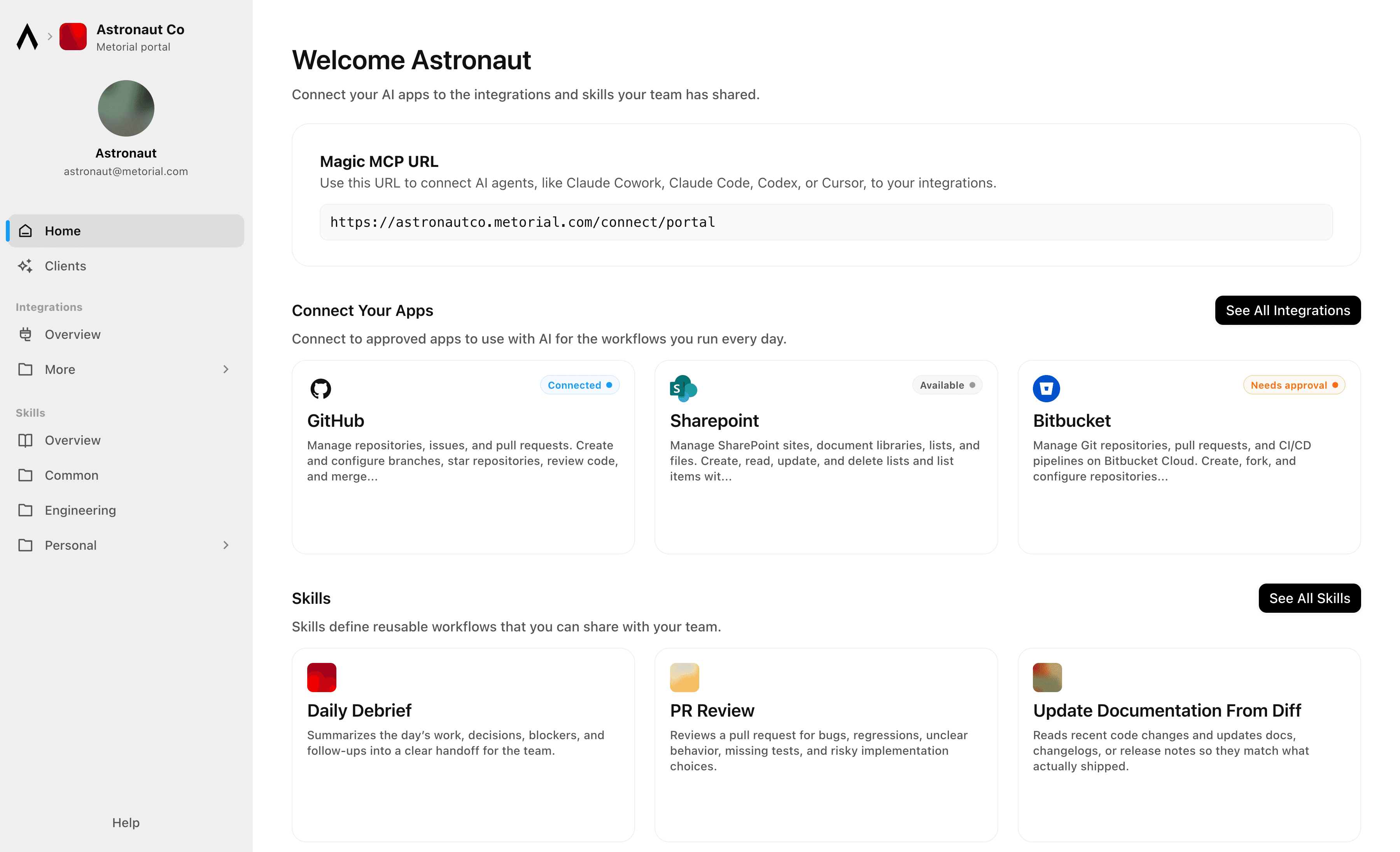
Metorial Portals lets employees connect AI agents to the integrations and skills your company already uses. People sign in with company SSO and connect through one Magic MCP URL. Admins decide who gets access to what.

lumon-industries.metorial.com
Metorial Portals showing the integrations and skills an employee can connect their agent to.
  1. Browse

    A catalog of approved tools and skills

    Employees open Metorial Portals to find the integrations and skills your company approved, in one familiar place, with no setup to figure out.

  2. Connect

    One link to start working

    People connect their agent through a single Magic MCP URL and sign in with the company login they already have, with no tokens to manage.

  3. Govern

    Each person sees only what they should

    Access groups and policies decide which tools and skills appear for each person, and people can request more when they need it.

Product

Magic MCP is a single URL you paste into your AI client. Sign in with the login you already use, and your agent reaches every integration and tool you allow it to use.

lumon-industries.metorial.com
A single Magic MCP URL connecting an AI agent to the integrations a person is allowed to use.
  1. One URL

    Paste one link into any agent

    Drop a single Magic MCP URL into any MCP-compatible client. Nothing to install and no integration to wire up tool by tool.

  2. Every tool

    1000+ integrations, plus your own

    The same link reaches a growing catalog of verified integrations and the custom or remote MCP servers only your team has, kept current for you.

  3. Your access

    Only what you allow, never more

    Sign in with the identity you already use and stay tokenless. Behind the link, every call runs on the real user and reaches only the tools they’re allowed.

Product

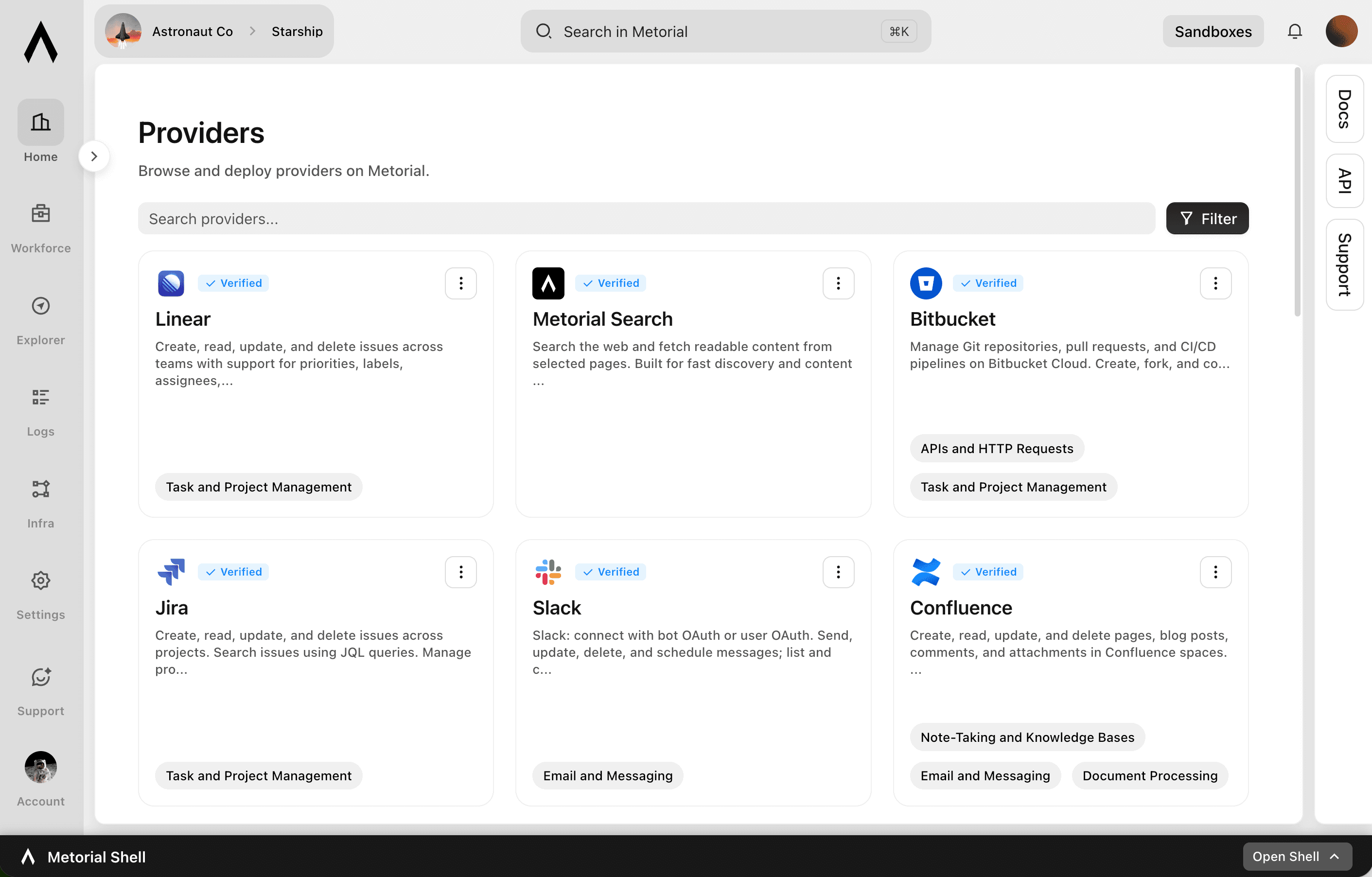
Start from 1000+ verified integrations or add your own, and give every one a governed path to your agents under existing SSO and access policies.

lumon-industries.metorial.com
The Metorial integrations catalog showing verified providers, tools, and access controls.
  1. Connect

    Any tool, ours or yours

    Start with 1000+ verified integrations or add the internal systems and private APIs only your team has as custom, remote, or Docker-based providers.

  2. Reach

    One link for every approved tool

    Agents reach the integrations they’re allowed to use through a single connection, with no connector project per tool.

  3. Govern

    Scoped and traceable by default

    Access follows the groups and policies you already manage, down to individual tools and actions, and every call stays on the record.

Product

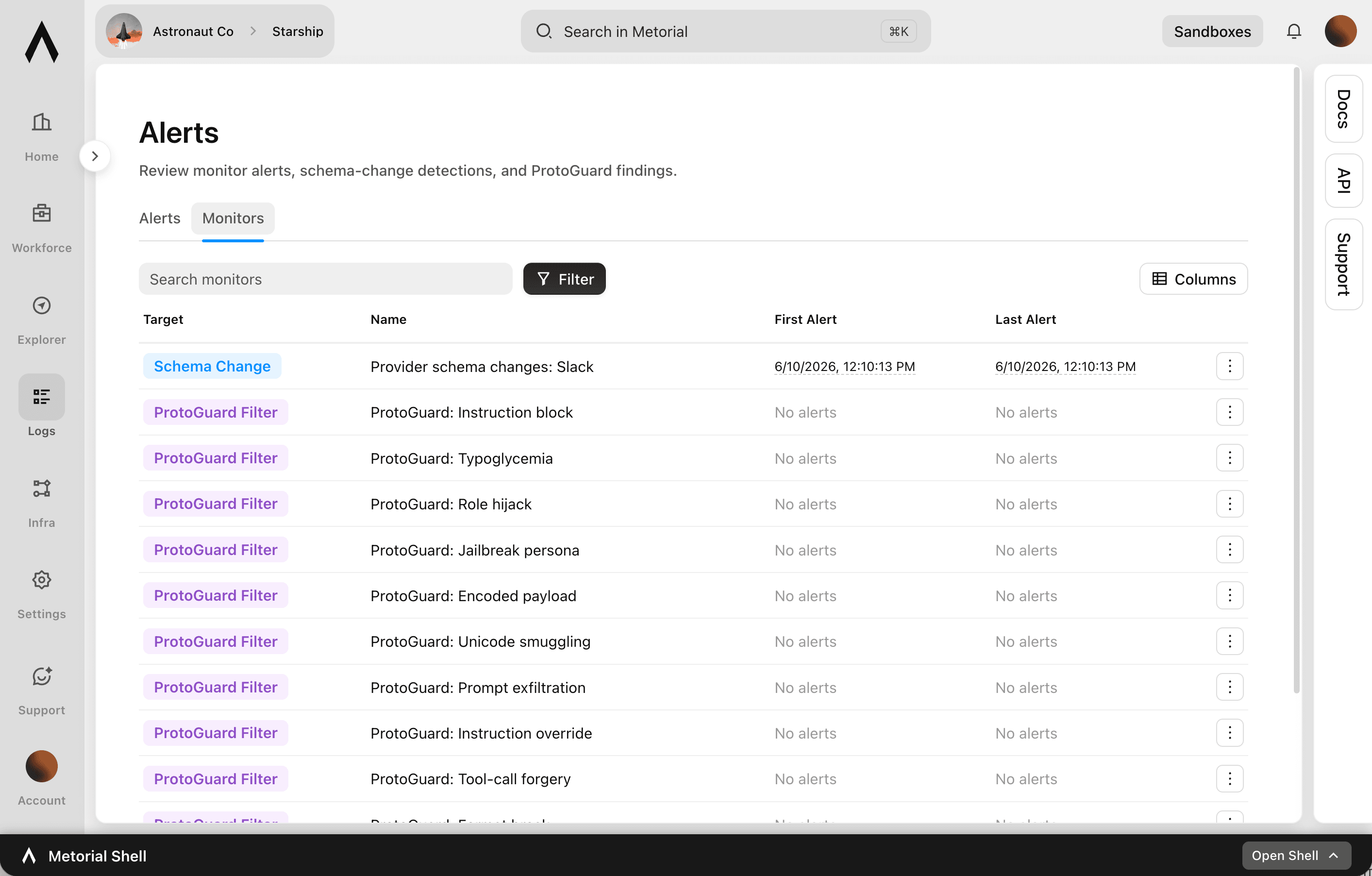
Metorial keeps a complete, searchable record of everything your agents, team, and machines do. See exactly what happened and trust AI in production.

lumon-industries.metorial.com
The Tracing console showing agent sessions, tool calls, and a full trace timeline.
  1. Capture

    Recorded automatically

    Every session, message, and tool call is recorded the moment it happens, with nothing for your team to set up.

  2. Attribute

    Which agent, on whose behalf

    Every action ties back to the exact agent that took it and the real person behind it. Nothing happens anonymously.

  3. Review

    Search and replay anything

    Monitor activity as it happens, then search past interactions and replay full sessions to answer questions from security and leadership.

Workflows

App Store Review Monitoring and GitHub Issue Triage

Monitor Google Play app reviews for negative feedback patterns, search GitHub for related known issues, create new issues for untracked problems, and notify the product team in Slack with a weekly review digest.

Automate Shopify Order Fulfillment Alerts via Twilio SMS

When Shopify orders meet specific criteria—high value, specific product type, or delayed fulfillment—send automated SMS alerts to the operations team via Twilio so nothing falls through the cracks.

Automate Shopify Refund Order Management and Customer Notifications via Twilio

When refund-eligible orders are identified in Shopify, process the order status update, notify the customer via SMS through Twilio, and keep the operations team informed of refund activity.

Bitbucket Pipeline Failure Triage and Issue Creation

When a Bitbucket Pipeline fails, identify the failing step, search for related recent commits, create a Bitbucket issue for the failure, and notify the responsible developer via Microsoft Teams.

Coordinate Hardware Field Support Cases Across HubSpot and Slack

When a field support case is escalated in HubSpot, automatically gather device and customer context, create a dedicated Slack channel for the case team, and post a structured briefing so field engineers can collaborate immediately.

Hardware Field Support Ticket Enrichment and Escalation

When a field support ticket arrives, enrich it with device and customer data from Salesforce, search for related known issues in GitHub, and escalate to the engineering team via Slack if a pattern is detected.

Investigate and Triage GitHub Issues Using Web Research for Context

For newly opened GitHub issues, search the web and relevant documentation pages to gather context about the reported problem, then add a structured comment with investigation findings and suggested next steps to help maintainers triage faster.

Kibana Alert Routing and Incident Case Management

When a Kibana alerting rule fires, evaluate the alert severity, create or update an incident case, execute the appropriate connector to notify the on-call team, and post a summary to the engineering Slack channel.

Manage Shopify Inventory Alerts and Restock Notifications in Microsoft Teams

Inventory managers at e-commerce and hardware companies often discover stockouts only after orders fail. This workflow scans Shopify inventory levels across locations, identifies products below reorder thresholds, and posts prioritized restock alerts to a Microsoft Teams channel for immediate action.

Monitor GitHub Actions Workflow Failures and Alert Teams in Microsoft Teams

CI/CD failures often go unnoticed until developers check their repository manually. This workflow monitors GitHub Actions workflow runs for failures, retrieves the job details, and posts a structured alert to the relevant Microsoft Teams channel so the on-call engineer can respond immediately.

Monitor GitHub Pull Requests and Post Review Summaries to Microsoft Teams

When pull requests are opened or updated in a GitHub repository, the agent reviews the diff context, posts a structured review summary to the engineering Microsoft Teams channel, and requests reviewers based on file ownership.

Shopify Inventory Reorder Alerts and Supplier Email Drafting

Scan inventory levels across Shopify locations, identify products below reorder threshold, and draft reorder emails to suppliers with product details and requested quantities ready for review.

Integrations

GitHub

Manage repositories, issues, and pull requests. Create and configure branches, star repositories, review code, and merge changes. Automate CI/CD workflows with GitHub Actions, manage workflow runs, secrets, and artifacts. Track issues with labels, milestones, and assignees. Search across code, repositories, issues, and users. Manage organizations, teams, and memberships. Create and manage projects, gists, packages, deployments, and environments. Access security alerts including code scanning, secret scanning, and Dependabot alerts. Read and write file contents in repositories. Manage webhooks, notifications, and codespaces.

Shopify

Manage e-commerce stores including products, orders, customers, inventory, and fulfillment. Create and update products with variants, images, and metafields. Process and track orders, draft orders, refunds, and transactions. Manage customer records, addresses, and marketing consent. Track and adjust inventory levels across multiple locations. Handle fulfillment workflows including routing to warehouses and third-party logistics. Create and manage discount codes, price rules, and automatic discounts. Configure shipping rates, carrier services, and delivery profiles. Build custom storefronts with cart management and checkout via the Storefront API. Manage content including pages, blogs, articles, and themes. Support B2B commerce with company profiles, catalogs, and custom pricing. Receive webhooks for events across orders, products, customers, inventory, fulfillment, collections, carts, checkouts, disputes, and more.

Microsoft Teams

Send, read, update, and delete messages in channels and chats. Create and manage teams, channels, and memberships. Schedule and manage online meetings, access call recordings and transcripts. Monitor user presence status in real time. Manage shifts, schedules, and time-off requests for frontline workers. Install and configure apps and tabs within teams. Send activity feed notifications to users. Subscribe to change notifications (webhooks) for messages, chats, teams, channels, memberships, presence, and meeting events. Create and manage tags for @mentioning user groups. Generate usage reports and import historical message data from other platforms.

Slack

Slack: connect with bot OAuth or user OAuth. Send, update, delete, and schedule messages; list and cancel scheduled messages; open DMs and group DMs; manage conversations, members, files, reactions, pins, bookmarks, reminders, user groups, and user status; search messages and files with user scopes; and retrieve user, conversation, and workspace info.

Twilio

Send and receive SMS, MMS, WhatsApp, and RCS messages. Make, receive, and monitor phone calls with programmable call control. Verify user identities via OTP, TOTP, and silent network authentication. Look up phone number intelligence including carrier, line type, caller name, and SIM swap detection. Manage multi-channel conversations across chat, SMS, and WhatsApp. Search for and purchase phone numbers, configure voice and messaging endpoints, schedule messages for future delivery, and inspect call recording metadata.

Sentry

Track, manage, and resolve application errors and performance issues. List, query, and bulk-update issues and error events with filters like status, assignment, and tags. Create and manage releases, associate commits, and upload source maps. Configure issue alert rules and metric alert rules with notification actions. Set up cron monitors to detect missed or failed scheduled jobs. Build custom dashboards with configurable widgets. Run ad-hoc Discover queries across errors and transactions for performance analysis. Manage organizations, teams, projects, and members. Provision users via SCIM. Access session replay data. Receive webhooks for issues, errors, alerts, comments, and installation events.

Linear

Create, read, update, and delete issues across teams with support for priorities, labels, assignees, due dates, and workflow states. Manage projects that group related issues, and organize work into time-boxed cycles (sprints). Create and manage documents, comments, and file attachments. Search issues using vector similarity or rich filters. Configure teams, workflow states, and labels. Track customers and link them to issues. Subscribe to real-time webhooks for changes to issues, projects, cycles, comments, documents, and more.

Bring AI agents into hardware operations

Connect agents to the systems your teams rely on, with onboarding that takes one sign-in.

Frequently asked questions

Common questions about Hardware.

  1. How do teams get started?
    People sign in to Portals with company SSO and connect their agent with one Magic MCP link. There are no tokens to copy and no code to write.
  2. Agents reach 1000+ verified integrations across support, logistics, and engineering tools, plus your own internal and custom providers, all through the same link.
  3. Yes. Expose internal engineering platforms as custom providers and agents reach them the same way they reach ticketing, logistics, and field tools.
  4. No. Connections are tied to the person’s identity, so an agent only ever reaches what that person is allowed to use. Access control lets you scope this by team.
  5. Yes. Every tool call, provider interaction, and user context is recorded with full tracing, so support, operations, and engineering teams can see what happened.