Moonfire
Solutions
Metorial gives every team the same foundation: one identity for everyone through company SSO, shared integrations and providers, and a single Magic MCP link to connect an agent. New use cases ship fast because the access layer already exists.
- 01
One identity for the whole workforce
People sign in with the SSO they already use, and their existing groups come along. Every agent acts on the real identity of the person behind it and stays within that person’s access.
- 02
Connect an agent in one step
A single Magic MCP link connects any agent to the tools it needs. There are no tokens to copy and no integration code to write, so teams onboard in minutes instead of weeks.
- 03
Shared integrations and providers
Teams build on the same 1000+ verified integrations, plus custom, remote, and Docker-based providers, rather than each maintaining its own connectors and auth.
- 04
Visibility as adoption grows
Tracing and audit logs show agent activity across teams, providers, and tools, so the picture stays clear as more of the company starts using AI.
One identity for everyone
People sign in with company SSO and connect through a single Magic MCP link. SAML and your existing groups carry over, so agents act as the person behind them.
Build on shared integrations
Every team draws from the same 1000+ verified integrations and providers instead of standing up a separate connector stack for each AI product.
New use cases go live fast
The access layer is already there, so a new agent or workflow starts from connected tools and known identities rather than from scratch.
Customer stories

Solution
Metorial Platform
Metorial connects AI agents to your tools, data, and providers, and keeps every connection governed, secure, and observable. One gateway, with access control, tracing, and isolated infrastructure underneath.
lumon-industries.metorial.com
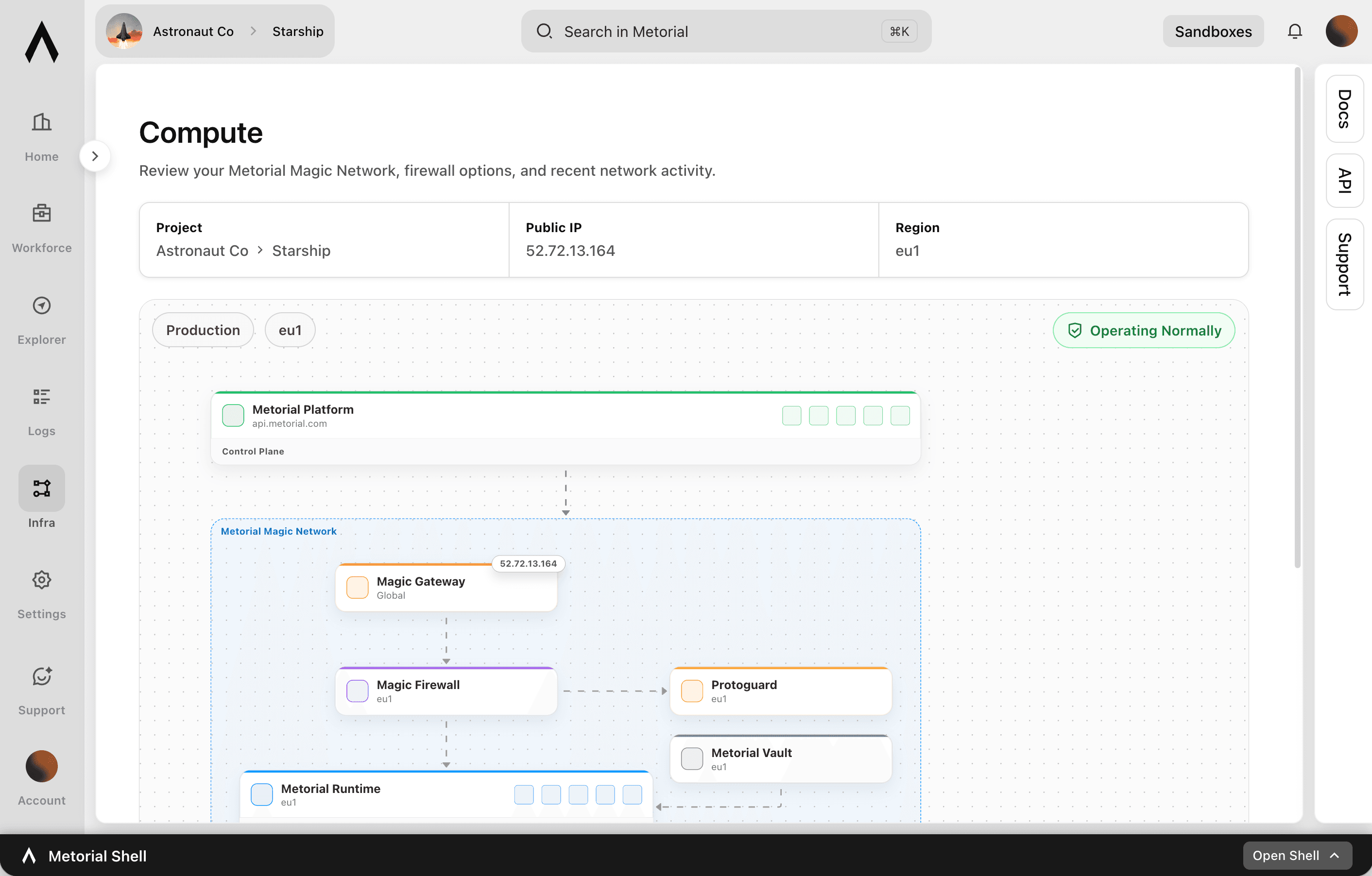
- Foundation
One access layer for every agent surface
Give every team shared integrations, providers, policies, and tracing instead of a separate connector stack for each AI product.
- Control
Manage providers and access centrally
Register and operate providers from one place, with access control and identity built into how agents use tools.
- Trust
Built for production security and visibility
Run connections in isolated infrastructure, check risky traffic, and trace every call so teams can rely on what they ship.
Product
Integrations
Start from 1000+ verified integrations or add your own, and give every one a governed path to your agents under existing SSO and access policies.
lumon-industries.metorial.com
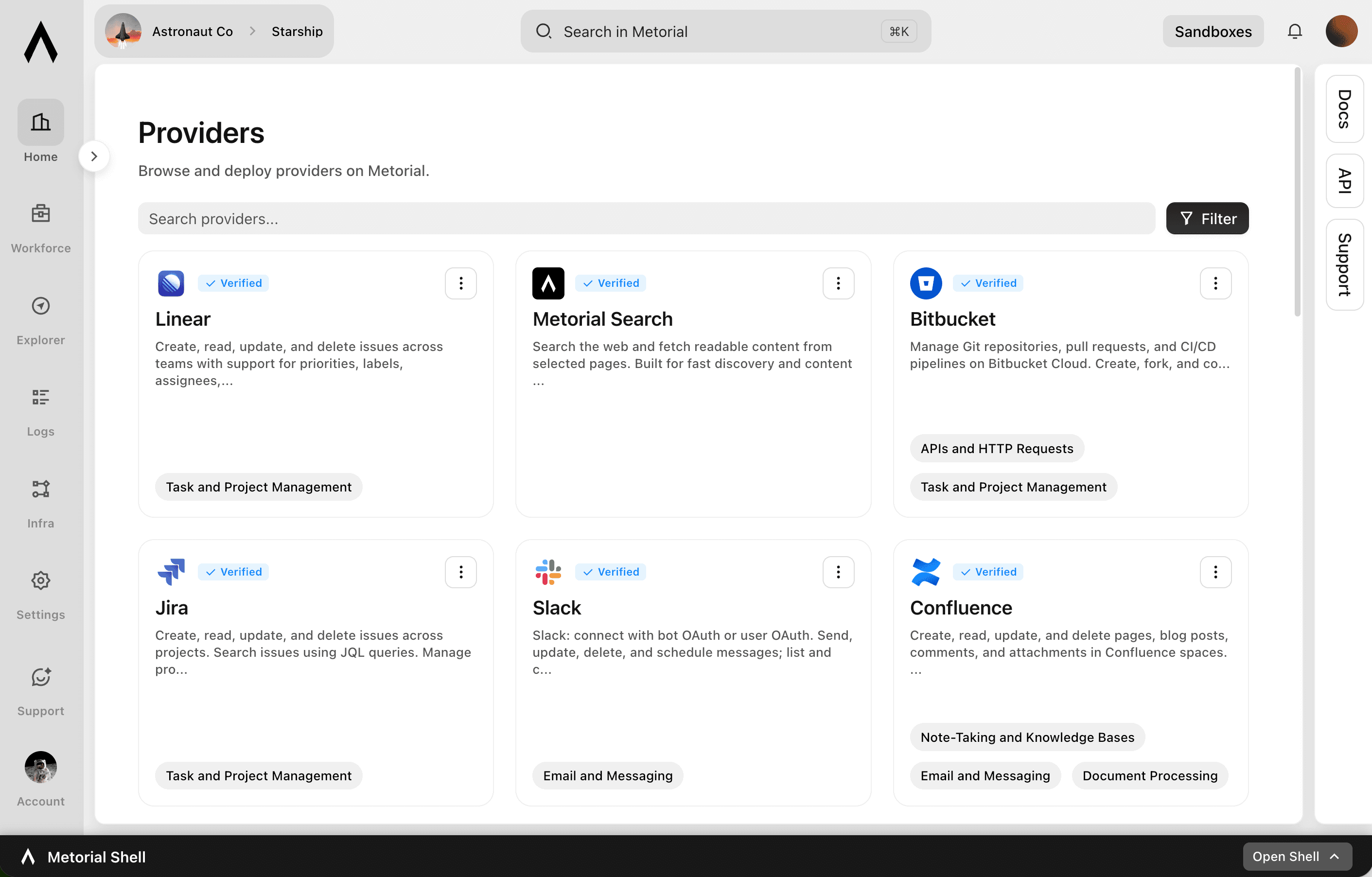
- Connect
Any tool, ours or yours
Start with 1000+ verified integrations or add the internal systems and private APIs only your team has as custom, remote, or Docker-based providers.
- Reach
One link for every approved tool
Agents reach the integrations they’re allowed to use through a single connection, with no connector project per tool.
- Govern
Scoped and traceable by default
Access follows the groups and policies you already manage, down to individual tools and actions, and every call stays on the record.
Product
Portals
Metorial Portals lets employees connect AI agents to the integrations and skills your company already uses. People sign in with company SSO and connect through one Magic MCP URL. Admins decide who gets access to what.
lumon-industries.metorial.com
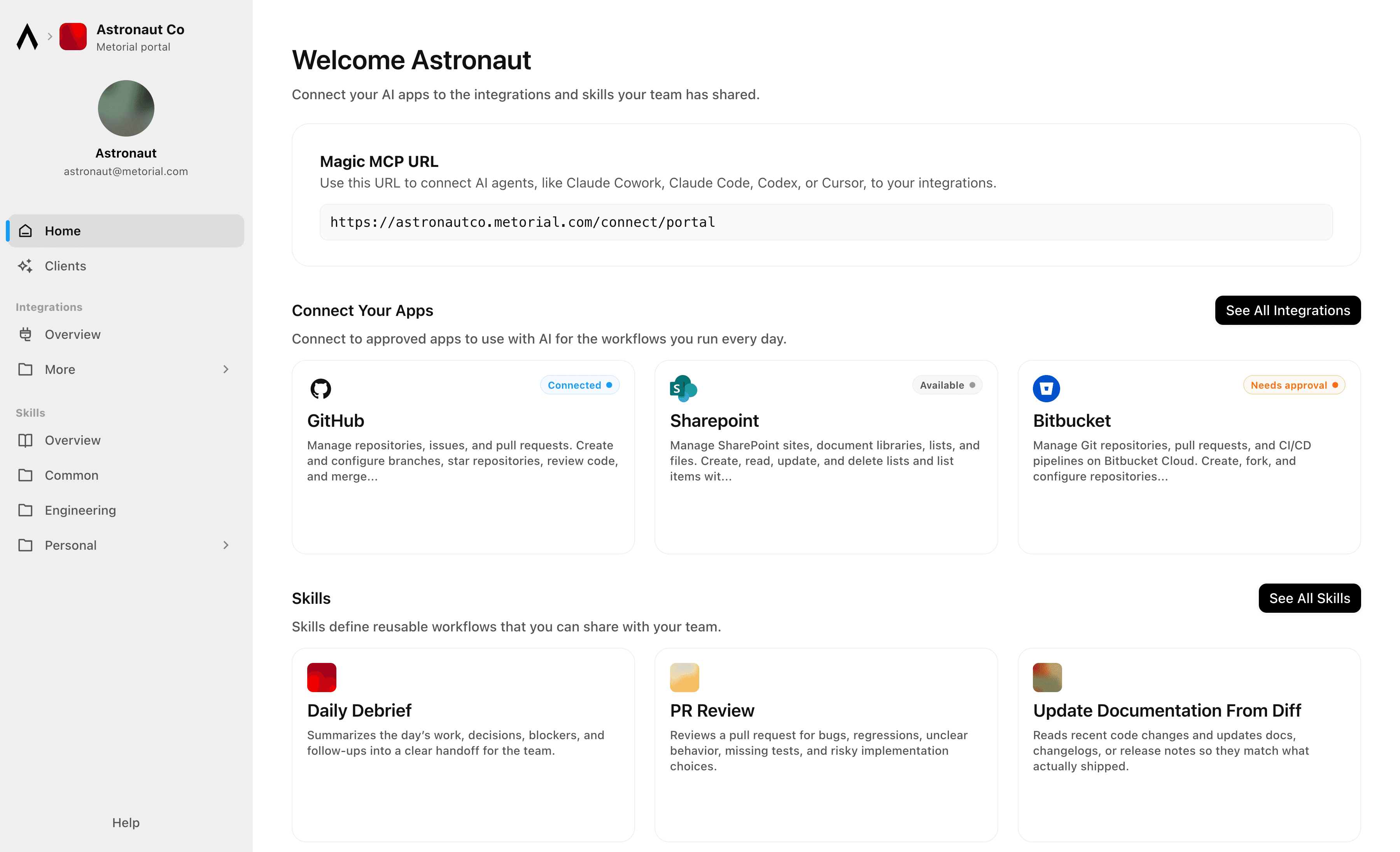
- Browse
A catalog of approved tools and skills
Employees open Metorial Portals to find the integrations and skills your company approved, in one familiar place, with no setup to figure out.
- Connect
One link to start working
People connect their agent through a single Magic MCP URL and sign in with the company login they already have, with no tokens to manage.
- Govern
Each person sees only what they should
Access groups and policies decide which tools and skills appear for each person, and people can request more when they need it.
Workflows

1Password Credential Rotation and Vault Audit for Engineering Teams
Audit 1Password vaults for stale or overly shared credentials, generate new secure passwords for service accounts, update the relevant vault items, and log all changes to maintain a clean secrets hygiene record.


Aggregate Customer Health Signals from Salesforce and Slack for Success Reviews
Customer success managers prepare for quarterly business reviews by manually pulling together account data from multiple sources. This workflow queries Salesforce for account and opportunity data, searches Slack for recent customer mentions, and compiles a health summary ready for the QBR meeting.


Aggregate Snowflake Revenue Data into Microsoft Fabric for Finance Reporting
The agent queries Snowflake for monthly revenue, churn, and expansion metrics, stages the results in Microsoft Fabric's OneLake, and triggers a Data Factory pipeline to refresh the finance reporting dataset.

Apollo Prospect Sequencing with Slack Deal Room Notifications
Search Apollo for new prospects matching updated ICP criteria, enroll qualified contacts in the right outbound sequences, and notify the sales team in Slack with prospect summaries so reps can personalize follow-up with full context.


App Store Review Monitoring and GitHub Issue Triage
Monitor Google Play app reviews for negative feedback patterns, search GitHub for related known issues, create new issues for untracked problems, and notify the product team in Slack with a weekly review digest.

Asana Project Kickoff from Salesforce Won Opportunity
When a Salesforce opportunity is marked closed-won, automatically create a structured Asana project with standard delivery sections and tasks, assign team members, and notify the delivery team so work can start without manual handoff.


Auto-Generate OpenAI Embeddings for SharePoint Documents to Power Search
The agent scans a SharePoint document library for new or recently updated files, extracts their text content, generates embeddings via OpenAI, and stores them in a vector store to enable semantic search across the knowledge base.


Automate HubSpot Ticket Creation from Agent Mail Inbound Emails
When support emails arrive in an Agent Mail inbox, extract key details, check for existing HubSpot contacts, create a support ticket, and send an automated acknowledgment reply—all without human triage.

Automate PR Review Requests from Linear Issues to GitHub
Engineering teams lose time manually creating GitHub pull requests and linking them back to Linear issues. This workflow reads in-progress Linear issues, checks for associated GitHub branches or PRs, and posts review request reminders to Slack when PRs have been open without review for too long.
Integrations
Slack
Slack: connect with bot OAuth or user OAuth to work with messages, conversations, search, files, Canvases, Lists, profiles, reactions, reminders, and workspace productivity settings.
GitHub
Manage repositories, issues, and pull requests. Create and configure branches, star repositories, review code, and merge changes. Automate CI/CD workflows with GitHub Actions, manage workflow runs, secrets, and artifacts. Track issues with labels, milestones, and assignees. Search across code, repositories, issues, and users. Manage organizations, teams, and memberships. Create and manage projects, gists, packages, deployments, and environments. Access security alerts including code scanning, secret scanning, and Dependabot alerts. Read and write file contents in repositories. Manage webhooks, notifications, and codespaces.
Hubspot
Create, read, update, and delete CRM objects including contacts, companies, deals, tickets, and custom objects. Manage associations between CRM records. Track engagements such as calls, emails, meetings, notes, and tasks. Send transactional and marketing emails, manage campaigns, and handle subscription preferences. Build and manage marketing workflows, sequences, and automation actions. Manage CMS content including blog posts, landing pages, and HubDB tables. Handle commerce data including products, orders, invoices, quotes, and payments. Create and manage contact lists for segmentation. Configure deal, ticket, and order pipelines with custom stages. Search and filter CRM records. Bulk import and export CRM data. Manage users, teams, and account settings. Subscribe to webhooks for real-time notifications on object creation, deletion, property changes, merges, and association changes.
Salesforce
Manage CRM data including Accounts, Contacts, Leads, Opportunities, Cases, and custom objects. Create, read, update, and delete records. Query data using SOQL and search across objects using SOSL. Perform bulk data operations for large-scale imports, exports, and migrations. Execute composite requests to batch multiple operations in a single API call. Access analytics, reports, and dashboards. Manage files and attachments associated with records. Interact with Chatter feeds, posts, and groups for social collaboration. Subscribe to real-time change events via Change Data Capture and Platform Events. Manage org metadata including custom objects, fields, layouts, and workflows. Query data using GraphQL for precise data retrieval across related objects.

Microsoft Outlook
Send, read, reply to, forward, and manage email messages in user mailboxes. Organize messages into folders, apply categories, flags, and importance levels. Manage file and item attachments. Create, update, delete, and respond to calendar events and meetings. Find available meeting times, manage attendees, handle recurrence, and work with shared or delegated calendars. Create, read, update, and delete contacts, organize them into contact folders, and manage contact photos. Manage tasks and task lists via Microsoft To Do, including due dates, reminders, recurrence, and checklist items. Subscribe to webhook notifications for changes to messages, calendar events, and contacts. Support for Focused Inbox, @-mentions, mail tips, send-on-behalf, and send-as capabilities.
Linear
Create, read, update, and delete issues across teams with support for priorities, labels, assignees, due dates, and workflow states. Manage projects that group related issues, and organize work into time-boxed cycles (sprints). Create and manage documents, comments, and file attachments. Search issues using vector similarity or rich filters. Configure teams, workflow states, and labels. Track customers and link them to issues. Subscribe to real-time webhooks for changes to issues, projects, cycles, comments, documents, and more.
Frequently asked questions
Common questions about Unified AI platform.
How do people connect their agents?
Everyone signs in with company SSO and connects through one Magic MCP link. There are no tokens to copy or code to write, and the agent acts on that person’s identity with tokenless auth.Why build every team on one platform?
Each new AI initiative reuses the same integrations and providers instead of rebuilding its own connector stack. A new use case starts from connected tools and known identities, so it ships fast.Does this work with our existing identity setup?
Yes. Metorial imports your existing groups and works with SAML SSO, giving everyone one identity across every agent. Policies then apply consistently across users, groups, tools, and providers.